

As you probably know by now, due to several established members' accounts being hijacked, forum management has decided to implement additional security measures in the form of "two-factor authentication" or 2FA as it is commonly known.
This means that you will, periodically, be required to provide a second form of pre-established identification at the time of login, to ensure that you are the account owner. This additional ID will be in the form of a six-digit code that is provided to you either by an "Authenticator" app on your mobile device, or via e-mail. This delivery model will be your choice, as you will see below.
On Saturday January 11, all forum members will be automatically required to establish a 2FA credential at the time you access the forum on that date, or the first time you log in after that date.
This post is intended to provide you with what you need to know to set this up. It should take perhaps 2 minutes to set up, if you follow the instructions below. If you have already set up and enabled 2FA on your account, as some members have done in the past, then no action is needed.
NOTE: You will need to go through this procedure as described below, for every individual device that you use to access the forum.
Instructions
At login, you will be presented with the following screen, notifying you that you are now required to set up a 2FA credential. The screen has a different look, depending on which "forum skin" (color scheme) you previously chose:
Default forum skin notification:

"Flat Awesome" forum skin notification:

Your first step is to click on the "two-step verification" link in the above notification. It's slightly difficult to see in the "Flat Awesome" example, but if you mouse over the link, you'll see it is a URL. Click on it.
The next screen you'll see is the following:
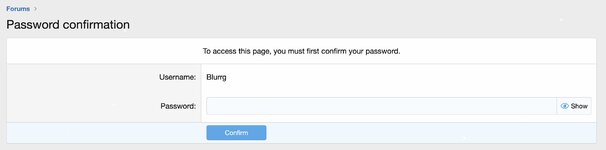
Enter your regular forum password into the password blank, and click the "Confirm" button.
This will then give you the following screen, which allows you to choose which two-factor authentication delivery model you want -- Authenticator App, or via e-mail. Make the selection that you prefer by hitting the "Enable" button:

If you choose "Verification code via app," you will then be presented with the following screen with QR code:

Open your Authenticator app (Google Authenticator or Microsoft Authenticator, available from your App Store), and use the camera function to "scan" the QR code into the app. This will establish an item for 500Eboard and your account ID. A six-digit code will be displayed in the App, and this is the code that you can then use to enter into the 2FA blank below the QR code.
If you choose the e-mail option, the system will automatically send an email to your e-mail address used to register for the forum. Go to your e-mail and get the six-digit confirmation code, and enter it into the blank as show below:
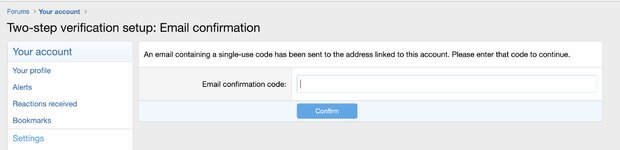
From there, you will have established appropriate credentials to access your account.
The next time you log in, the system will ask you for your 2FA credentials, per the screen below. You will also see an option, which should be pre-checked (you can uncheck it if you wish, but it is not recommended), to not require further codes for a period of 30 days. At this point, you will be required to acquire a new six-digit code via app or email and re-enter it.

Hopefully this helps you implement the 2FA, when it goes live for all members in the forum.
If you have any questions or comments, please make this in the following thread:
This means that you will, periodically, be required to provide a second form of pre-established identification at the time of login, to ensure that you are the account owner. This additional ID will be in the form of a six-digit code that is provided to you either by an "Authenticator" app on your mobile device, or via e-mail. This delivery model will be your choice, as you will see below.
On Saturday January 11, all forum members will be automatically required to establish a 2FA credential at the time you access the forum on that date, or the first time you log in after that date.
This post is intended to provide you with what you need to know to set this up. It should take perhaps 2 minutes to set up, if you follow the instructions below. If you have already set up and enabled 2FA on your account, as some members have done in the past, then no action is needed.
NOTE: You will need to go through this procedure as described below, for every individual device that you use to access the forum.
Instructions
At login, you will be presented with the following screen, notifying you that you are now required to set up a 2FA credential. The screen has a different look, depending on which "forum skin" (color scheme) you previously chose:
Default forum skin notification:
"Flat Awesome" forum skin notification:
Your first step is to click on the "two-step verification" link in the above notification. It's slightly difficult to see in the "Flat Awesome" example, but if you mouse over the link, you'll see it is a URL. Click on it.
The next screen you'll see is the following:
Enter your regular forum password into the password blank, and click the "Confirm" button.
This will then give you the following screen, which allows you to choose which two-factor authentication delivery model you want -- Authenticator App, or via e-mail. Make the selection that you prefer by hitting the "Enable" button:
If you choose "Verification code via app," you will then be presented with the following screen with QR code:
Open your Authenticator app (Google Authenticator or Microsoft Authenticator, available from your App Store), and use the camera function to "scan" the QR code into the app. This will establish an item for 500Eboard and your account ID. A six-digit code will be displayed in the App, and this is the code that you can then use to enter into the 2FA blank below the QR code.
If you choose the e-mail option, the system will automatically send an email to your e-mail address used to register for the forum. Go to your e-mail and get the six-digit confirmation code, and enter it into the blank as show below:
From there, you will have established appropriate credentials to access your account.
The next time you log in, the system will ask you for your 2FA credentials, per the screen below. You will also see an option, which should be pre-checked (you can uncheck it if you wish, but it is not recommended), to not require further codes for a period of 30 days. At this point, you will be required to acquire a new six-digit code via app or email and re-enter it.
Hopefully this helps you implement the 2FA, when it goes live for all members in the forum.
If you have any questions or comments, please make this in the following thread:
Two-Factor Authentication (2FA) - Comments & Questions | Announcements and Admin
This thread is here for forum members with questions or comments about the upcoming "two-factor authentication" schema, to get answers or information as necessary. Feel free to fire away! Thank you 500Eboard Administration
www.500eboard.co


