• Hi Guest !

    Welcome to the 500Eboard forum.

    Since its founding in late 2008, 500Eboard has become the leading resource on the Internet for all things related to the Mercedes-Benz 500E and E500. In recent years, we have also expanded to include the 400E and E420 models, which are directly related to the 500E/E500.

    We invite you to browse and take advantage of the information and resources here on the site. If you find helpful information, please register for full membership, and you'll find even more resources available. Feel free to ask questions, and make liberal use of the "Search" function to find answers.

    We hope you will become an active contributor to the community!

    Sincerely,
    500Eboard Management

BUG REPORTS DISCUSSION -- for new forum

hacking did wonders :) Pictures are back :) video links are not.But i think you are doing a great job Gerry :)
I think I can pretty easily fix the embedded video link issue, but I have one thing to resolve before I do that. Hopefully I can get the video links fixed by the end of the weekend, if not before. It shouldn't be difficult, I did the same thing on the old forum.
 
In the future, folks don't need to embed youtube videos with special codes.

All you have to do is just paste the full URL of the YouTube video into your post. The forum will automatically resolve it into the proper codes, and embed it appropriately.
 
In the future, folks don't need to embed youtube videos with special codes.

All you have to do is just paste the full URL of the YouTube video into your post. The forum will automatically resolve it into the proper codes, and embed it appropriately.
Oooooo. That would be cool!

:gor-gor:
 
Another item: Can image insertion be defaulted to thumbnails? The page load time was several MINUTES on this new thread due to a few dozen high-res images being inserted in-line:


Worse yet, I don't see an easy way to fix it. When I edit the thread and try to change all to thumbnails, the thumbnails appear to insert below the full-size images.

:doh:
Problem is, even if limited to 3MB, the same issue remains... deathly slow load times. That's why on VB, I would always change people's inline images to attachments - page loads 10x faster when there are a lot of pics. Long page load times is very high on my list of pet peeves with any forum, or any web page for that matter.

:matrix:
It can be, but more likely I will tweak the image settings so that these nasty type of high-res images are not able to be attached. That's some tweaking with the physical size as well as the file size. Maybe I can put a 3MB limit on images.

I try to be a nice guy and be generous with the file size limits, and then someone creates a thread and attaches 25 images of 5MB each. SIGH.
This has now been fixed.

You can fix this by going into (editing) a post and removing all of the displayed images inline (but NOT the attachments) if they are full-size. Then you can specify all of the attached images to display either as thumbnails, or full-size images. If clicked, a thumbnail image will expand into the "lightbox" display.

See the post you linked to for the tweak that I describe above.

I have it set so that any linked images in future posts, which are then automatically downloaded and captured on the server (much like the tweak I'd done to the old server, which has caused some issues after the migration here), are automatically displayed as thumbnail images once stored on the XenForo server. We'll see if this tweak works.

In any case, I think the issue has generally been solved.

In the meantime, if you could get into the 21st Century and get off the circa 1997 56K US Robotics dial-up modem, since you don't have a cell phone to display images that way, it would be very helpful. I know that your Windows NT doesn't necessarily need high data speeds, but a lot of stuff these days actually DOES.

winnt351.png

winnt351.png
 
As I said, I un-forwarded the old 500Eboard.com domain. This allows the proxy server on this new forum, to go back to the old site and "fetch" imported images stored there, and then moves/stores them on this site going forward. I'm going to have to leave this un-forwarded for quite some time, until folks click on enough threads to proxy and store the images here.

Since yesterday, when I unforwarded the old domain, the proxy has already stored more than 1,600 of the imported images. There are some images that aren't going to come over, but at this stage it's important that we try to get as many as we can. (As a backup, I also have all of the imported images stored on our server, but unfortunately I can't change the requests in each post to go out to the old site to get them from there).

As LWB said, folks need to update their bookmarks to "500eboard.co/forums" instead of ".com/forums"

One of the next projects I'm going to do is create a "home page" at 500eboard.co that will be a landing page and then link to the forums. I had the same thing implemented at the old site. That way when someone goes to 500Eboard.co, they will see something come up. Right now I have the server set up so that it provides an error message, so that folks can't see the files and folders that are stored in the public_html directory. It was a very temporary fix until I get a "normal" home page set up. It's fairly easy to do within this forum's software.

Gerry,

Are the image locations (URL) in a MYSQL database table? If so, I might be able to put together a script that will allow you to do a mass modify to the URL if you can drop all the images in one directory on the new server.

I.e change http::/500eboard.com/images/* to http://500eboard.com/oldimages/*

Let me know if this makes sense.
 
The images are not stored in the database, but are stored in the file system...... in a folder on the server (also on the old server, same file structure).

I'm going to have to write a redirect script and put it in the .htaccess file at the root of the old server's forum root folder. That way any incoming requests will get redirected back to the same file, on this server. We have already proxied more than 3,200 files from the old server, so they are steadily accumulating. All proxied images are being stored permanently on this server.

I was traveling all of this week, so did not have a lot of time to work on this.

if you want to take a stab at it, that's great.

The draft php script I'd created, but not implemented, to do this is:

Redirect “/images/imported/” "https://www.500eboard.co/forums/data/imported/”
 
Knocked a couple more bugs off of the bug list this morning. Still have some doozies to tackle, though.....
I killed a MAJOR problem just now, that was preventing the system from fully indexing all of the posts and threads for the built-in search engine. It's been fixed, and I was able to successfully index everything.

The built-in search engine should work a bit better now.

I will start tackling troubleshooting for the Gonzo "elasticsearch" search engine soon. One of the issues with it at the moment, is that the logstash process (part of the elasticsearch bundle) is using 150-200% of processing power, when it should perhaps be using 3-10% at most.
 
We have seemed to have dozens of people freaking out, wigging, and going postal about the "old" 500Eboard site not working.

Of course, they have not bothered to pay any attention to the ample warning that has been provided on the other forum, about the migration, the new URL for the site, and associated changes.

My e-mail, PMs, instant messages, text messages, phone have literally been BLOWING UP for the past week with people accusing me of "breaking" the site, wondering what has been happening, and so forth.

I've finally had to create a quick and dirty web page to inform the laggards about what is happening. Hopefully this will stanch the flow of communications where people are completely freaked out.

https://www.500eboard.com
https://www.500eboard.com/forums

In addition to plenty of warning and transparency about what was happening on the other site, many days ahead of the migration, I have also sent out AFTER the migration both an e-mail and a "private message" to all registered users of this site. And I still get "freak-outs".

Not sure what else I can do, but creating this HTML page is my last resort. All further "what did you do to 500Eboard?!?!?!?!?!" freak-out communications will be ignored and deleted.
 
Not sure if this is the right thread to mention this, but I've just accessed JC220's "Owner" thread, page 23, to find that many of the member's submissions are followed by incomprehensible, and what I assume to be, computer coding of some kind?
 
Yep, it's the right thread. Looks like something that JC did when attaching/pasting images on the old forum didn't translate well in the migration. Don't know why, and from what I've seen only his posts have this problem. Don't really know what to do about it, but at some point I could probably switch out the images. I need to "fix" the old forum to bring it back up, so that I can access stuff.
 
I'm having a tough time finding the paint codes. You know the page that shows the colors and how many of each were built?
 
That is part of the Wiki.

Hasn’t been implemented yet and the content hasn’t been brought over from the old forum. It will be.
 
Gerry, have you tried to merge duplicate threads yet? We use this all the time when someone doesn't search by VIN and re-posts a car for sale. OMG... what a freaking nightmare. Major miss by the XF team, IMO. I had to Google how to do it, and the answer posted by a XF developer was nearly useless except for letting me know it was somehow still possible.

https://xenforo.com/community/threads/merging-threads.152829/

tourmeister's recommendation in post #4 above is 100% correct and apparently fell on deaf ears.

:thumbsdown:
 
I like it better overall but miss some features. Specifically being able to display new posts in a thread at the top. "Filter" doesn't appear for me in a thread.
Glen, can you expand directly on the behavior that you are experiencing, as opposed to what you want to see (or experienced on the old forum)? It's highly likely that I can configure things on this forum to re-create the behavior that you want, or what was found on the vBulletin site. I am honestly just not understanding what you are referencing. A step by step description of what you would click -- and see -- would be helpful.

Thanks
Gerry
 
Gerry, have you tried to merge duplicate threads yet? We use this all the time when someone doesn't search by VIN and re-posts a car for sale. OMG... what a freaking nightmare. Major miss by the XF team, IMO.
Dave, it's not a major miss that I know of -- it's a configuration issue on my part that I have not gone through and completed. There is A LOT of small config issues for the forums that I'm seeing, and I'm going to have to go through with a fine toothed comb and fix them.

BTW, if you were using Tapatalk, you would be an Admin there and the merging is exceedingly easy to do on a phone. But unfortunately, you are still pre-cell-phone.

:runexe:
 
Glen, can you expand directly on the behavior that you are experiencing, as opposed to what you want to see (or experienced on the old forum)? It's highly likely that I can configure things on this forum to re-create the behavior that you want, or what was found on the vBulletin site. I am honestly just not understanding what you are referencing. A step by step description of what you would click -- and see -- would be helpful.

Thanks
Gerry

So, take this thread that we are in (BUG REPORTS DISCUSSION -- for new forum)...I would like to see the newest posts at the top of the page instead of at the bottom. Basically, the reverse of how posts are displayed now, newest posts at the bottom. So, if this post was the the most recent, it would show up at the top. Does that make sense?
 
BTW, if you were using Tapatalk, you would be an Admin there and the merging is exceedingly easy to do on a phone. But unfortunately, you are still pre-cell-phone.
Harrumph. Screenshots or it didn't happen!!

:D :P
 
So, take this thread that we are in (BUG REPORTS DISCUSSION -- for new forum)...I would like to see the newest posts at the top of the page instead of at the bottom. Basically, the reverse of how posts are displayed now, newest posts at the bottom. So, if this post was the the most recent, it would show up at the top. Does that make sense?
Hi Glen,

I get it now. Unfortunately, unlike vBulletin 3.x and 4.x, which give you that option in the User Preferences so you can customize your forum thread display, you can't do this in the XenForo User Preferences.

It is technically possible to do this, but I have to go in and modify some code, and I am trying to minimize that when possible. This is because all code modifications have to be re-created every time the forum software gets updated, if they are incompatible (and this happens).

I will work on getting an "Add-On" that does this, which doesn't require as much messing around when the forum software is updated by XenForo, and will report back when this is done. I'll add it to the "bug list" for now.

BTW, was this the same thing that Bogeyman said he wanted to see (which is already on the Bug List)?
 
Hi Glen,

I get it now. Unfortunately, unlike vBulletin 3.x and 4.x, which give you that option in the User Preferences so you can customize your forum thread display, you can't do this in the XenForo User Preferences.

It is technically possible to do this, but I have to go in and modify some code, and I am trying to minimize that when possible. This is because all code modifications have to be re-created every time the forum software gets updated, if they are incompatible (and this happens).

I will work on getting an "Add-On" that does this, which doesn't require as much messing around when the forum software is updated by XenForo, and will report back when this is done. I'll add it to the "bug list" for now.

BTW, was this the same thing that Bogeyman said he wanted to see (which is already on the Bug List)?

Thanks Gerry. It's not that important just a preference I like. Don't put too much effort into making it happen, there are plenty of other things that are more important. And yes, I believe it's the same thing Bogeyman wanted.
 
Yes, "what's new" on this version gives me the new posts but an option to show the newest posts first would be perfect.....
No hurry, I've been through what you're going through so I realize how "it used to do this" can be frustrating.
 
Next Whiny Complaint:

The VB image attachment box popped out conveniently to a separate window, and allowed up to 10 images/URL's to be uploaded at a time. When uploading 100+ images (or even a couple dozen), this was extremely helpful.

XF seems to only allow 1 image/URL to be uploaded at a time, and since it doesn't pop out to a separate window, you can't Alt-Tab back & forth quickly between the source and destination. Is this a configuration, or another XF hard-coded "feature"?

Example - this car for sale has 216 images:
https://www.500eboard.co/forums/ind...l-black-black-leather-92kmi-neptune-nj.13001/

Normally I would upload all of them (or, almost all, I don't upload images which are nearly identical to each other where the foo-tographer moved 10 inches and re-shot the same pic). How can I batch-upload large numbers of pics like we could in VB?

DITOG no grok.

:oldman:
 
XF seems to only allow 1 image/URL to be uploaded at a time, and since it doesn't pop out to a separate window, you can't Alt-Tab back & forth quickly between the source and destination. Is this a configuration, or another XF hard-coded "feature"?
This statement is 100% NOT CORRECT.

There are actually THREE WAYS to attach images to a post. Two of these ways allow multiple (as many as desired) images to be uploaded at a time. The third method (drag and drop) only allows one image at a time, but is pretty convenient.

For the first method:

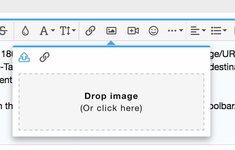
In a post, you click on the "Insert Image" (CTRL-P shortcut) icon in the toolbar.
78514


You will see this box pop up.
78515


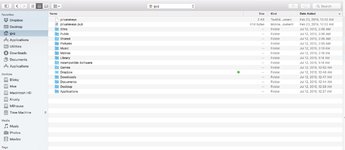
Click in the box, and your computer will go to a Finder (Mac) or File Manager (Winblows) menu.
78516


From there you can select however many files/images that you want, and the system will automatically upload them from there.

For the second method:

You can also drag and drop one file at a time into the box shown above.


For the third method:

You can use the "Attach files" button below, and specify as many images/files as you want to be inserted. They will automatically load themselves once you specify them.
Screenshot 2019-03-23 10.31.32.jpg


How in the heck do you think I have been uploading images en masse into the Gallery Photo Albums over the past few days? I do one album at a time, no matter whether it has one, or 100, images inside the photo album.

:jelmerian:

Cheers,
Gerry

P.S. This capability is again, superior to vBulletin. I had vBulletin configured for its maximum of 10 images to be uploaded, and each image required a separate operation to add it to the list and then to upload the group. In contrast, XenForo allows many dozens of images to be uploaded in a single operation, saving significant time and clicks in the process.
 
Gerry, to clarify:

How do I upload multiple files FROM URL's... not a local device?

I don't want to have to double the work by first downloading everything to my PC, then batch-uploading. VB allowed batch uploads directly from URL's.
 
How do I upload multiple files FROM URL's... not a local device?

I don't want to have to double the work by first downloading everything to my PC, then batch-uploading. VB allowed batch uploads directly from URL's.
Click the button, and then click the URL link icon in the window that pops up:

78526


Then you fill in the URL, as with the example below from your site:

78527


When you click "Insert" -- it will put the specified image right in line in the post where the cursor is.

You can only insert one image at a time from a URL, unlike vBulletin, which allowed up to 10 (a drawback for XF). The flip-side is that you get granular control of where each URL-loaded image is placed in the post.

Personally, I never used the "upload from URL" feature in vBulletin, I don't think even one time.
 
You can only insert one image at a time from a URL, unlike vBulletin, which allowed up to 10 (a drawback for XF).
That's what I was afraid of.


Personally, I never used the "upload from URL" feature in vBulletin, I don't think even one time.
I use the "Upload by URL" almost exclusively. It's how probably more than half of the photos on the forum were uploaded, especially in the E500E Cars For Sale subforum. The vast majority of cars for sale are listed on some other site, and we archive those photos to the forum.

:runexe:
 
Someone just pointed out that the "press / magazine articles subforum" is MIA... did the link get misplaced in the migration?

:detective:
 
Someone just pointed out that the "press / magazine articles subforum" is MIA... did the link get misplaced in the migration?

:detective:
It's here -- all forums came across. I guess I have more work to do with regard to permissions configuration.....
 
That's what I was afraid of.


I use the "Upload by URL" almost exclusively. It's how probably more than half of the photos on the forum were uploaded, especially in the E500E Cars For Sale subforum. The vast majority of cars for sale are listed on some other site, and we archive those photos to the forum.
I don't have an answer for that yet, but from what I know, you can only upload one image from URL at a time, vs. as many as desired when they physically are on the computer.

What I would do (and what I used to do on the old forum) was right-click each image to my hard drive, and then attach each one. It's not too much effort to right-click an image to save it locally. When you do this, then it's MUCH easier and quicker to highlight the images locally that you want to upload, and it's done straightaway.

Again, it's a different way of doing things -- not any worse or better IMHO.

I will continue to do more research on this, and see what can be done.
 
Someone just pointed out that the "press / magazine articles subforum" is MIA... did the link get misplaced in the migration?

:detective:
Following up on this ... permissions look fine and appropriate, and equivalent for this sub-forum to the previous forum. Not everyone gets access to this sub-forum.


:update:

I just tested this out and everything is 100% fine. I have test accounts with "Registered User" and also "Trusted User" status, and both are showing as appropriate as they should.

So, I don't know where you got that info, but if you want to have the member who flagged it to you, please contact me, then I will troubleshoot their permissions.
 
How can I batch-upload large numbers of pics like we could in VB?

DITOG no grok.
You're going to have to right-click them to a folder on your hard drive, and then highlight all of them in one batch, and then click "Upload"

In all honestly, this is probably less work -- or at most the same amount of work -- as doing it with your URL way (with the vBulletin max setting of only 10 at a time) and manually pasting URLs, and switching between windows each time.

Each image to right click to a hard drive would be one click to highlight, and one click (or ENTER PRESS) to save it, then move on to the next one.

When all 10 (or 200) images are saved, then you just use SHIFT or CTRL to highlight the ones to be uploaded, and Upload them en masse, one shot.

Screenshot 2019-03-24 08.09.53.jpg
 
Following up on this ... permissions look fine and appropriate, and equivalent for this sub-forum to the previous forum. Not everyone gets access to this sub-forum.

I just tested this out and everything is 100% fine. I have test accounts with "Registered User" and also "Trusted User" status, and both are showing as appropriate as they should.

So, I don't know where you got that info, but if you want to have the member who flagged it to you, please contact me, then I will troubleshoot their permissions.
Gerry, can you post a screenshot of where this forum is located in the main page? I see press article forums for AMG, 400E, and 126... but not 500E. It's possible I'm blind and just can't find what's in front of my face, but a screenshot would confirm... thanks!
 
Gerry, can you post a screenshot of where this forum is located in the main page? I see press article forums for AMG, 400E, and 126... but not 500E. It's possible I'm blind and just can't find what's in front of my face, but a screenshot would confirm... thanks!
Screenshot 2019-03-24 11.27.41.jpg
 
Yep, I don't have that "FULL MEMBERS ONLY" section appearing at all... apparently some other Señor Members don't either. Could you look into the permissions? Thank you sir!

:detective:
 
Yep, I don't have that "FULL MEMBERS ONLY" section appearing at all... apparently some other Señor Members don't either. Could you look into the permissions? Thank you sir!

:detective:
Is that better?


Uploaded any images lately? :stickpoke: :hornets:
 
Another possible issue, related to this thread:
https://www.500eboard.co/forums/index.php?threads/mb-celebrates-an-e500-double-anniversary.12986/

It seems the search function is not finding the above thread, for example search "Jalopnik Porsche" and it's MIA in the results:
https://www.500eboard.co/forums/index.php?search/619/&q=jalopnik+porsche&o=date

Even in Advanced Search, there are no results. I think this is why multiple people posted the same link(s), because if they did search, nothing was found.

:scratchchin:
 
Apologies if this has been reported already (or alternatively if its as intended and NOT a bug). I noticed that the way owner thread titles appear in tapatalk has changed. Previously, the title was something like ‘OWNER: Xxx’. Now it appears to simply be ‘Xxx’ which can be a little uninformative depending on the user name. See below for an example of Brownan’s new owner thread:

e0b7f6d3fcf3537614d39fe4d14eb4ef.jpg


Sent from my iPhone using Tapatalk
 
Back
Top