• Hi Guest !

    Welcome to the 500Eboard forum.

    Since its founding in late 2008, 500Eboard has become the leading resource on the Internet for all things related to the Mercedes-Benz 500E and E500. In recent years, we have also expanded to include the 400E and E420 models, which are directly related to the 500E/E500.

    We invite you to browse and take advantage of the information and resources here on the site. If you find helpful information, please register for full membership, and you'll find even more resources available. Feel free to ask questions, and make liberal use of the "Search" function to find answers.

    We hope you will become an active contributor to the community!

    Sincerely,
    500Eboard Management

BUG REPORTS DISCUSSION -- for new forum

Apologies if this has been reported already (or alternatively if its as intended and NOT a bug). I noticed that the way owner thread titles appear in tapatalk has changed. Previously, the title was something like ‘OWNER: Xxx’. Now it appears to simply be ‘Xxx’ which can be a little uninformative depending on the user name. See below for an example of Brownan’s new owner thread:

View attachment 79045


Sent from my iPhone using Tapatalk
This is NOT a bug.

This is because I have implemented the "Prefixes" feature on the web-based forum. This provides a set group of prefixes available in select forums that help visually clarify specific posts. Owner and For Sale/Wanted posts are among these. Unfortunately Tapatalk does not currently pick up and display these prefixes -- that is THEIR problem.

Also, Tapatalk DOES indicate which sub-forum the post appears in, as shown in your image.

I will be gradually removing the "OWNER" and "FS" and "WANTED" from various threads and replacing these phrases with the appropriate prefixes over time. This is to avoid having, for example, OWNER (prefix) next to "OWNER - gsxr" where the term "OWNER" is redundant.

This is just something that Tapatalk users are going to have to deal with. Your other option is to just view the forum via a mobile web browser, where prefixes will display appropriately.

One of the key benefits of XenForo is that it is HIGHLY mobile browser friendly. This largely negates the need for Tapatalk going forward. I have been doing some research online about Tapatalk, and have had (personally) some growing concerns about its security and privacy. So much so, that I may well stop allowing it to access the forum, given that the XenForo software displays now very nicely on mobile devices and tablets.

Tapatalk has also changed pretty dramatically their payment setup for forum owners. In the past, I would get about $5.00 ever three of four months (about $20 a year total) from Tapatalk as renumeration for ads served to Tapatalk members using that app. They have changed their payment scheme pretty significantly, and I essentially get zero payment from them -- I have not received anything in over a year now. Which is fine, as it was a small and insignficant amount, but they have gotten greedy and are not compensating forums in the same way, and to the same extent, that they used to.

I am not seeing any real benefit to it going forward, but I'm willing to listen to folks prove me wrong on that.

Try using the web version of the forum instead of the Tapatalk version, and things will display as intended / correctly.

This is what I want:
79082

This is what I DON'T want:
79083
 
Last edited:
Completely agree with your "What I want image" that looks great.

I would love tapatalk to continue to have access here. I love the convenience of having all my forums in one spot in one app.
 
Now that you mention it Gerry, I am on a small (60 members) friends forum and there is decided recently to close the access to to forum by Tapatalk. There were indeed bugs in privacy...
Good that you already aware. I will dive into that and let you know (by pm via browser) what the specific reason was for closing in that forum.
 
I'm going to focus on a couple of things this weekend:

1) Making more progress on getting more photo albums migrated over to this forum

2) Extending "random banner rotation" support from just the "Default" skin to the "Flat Awesome" skins

3) Adding a "light switch" on the forum home page that will allow quick, one-button switching between the Flat Awesome Light and Dark skins

4) Doing some administrative work to reconcile some outdated elements of the Flat Awesome skins (more of an administrative irritant, not anything that is wrong or a problem that you guys experience)

5) Finally doing a monthly Ubuntu operating system update.

6) Removing Tapatalk from this forum once and for all.

Cheers,
Gerry
 
I'm going to focus on a couple of things this weekend:

1) Making more progress on getting more photo albums migrated over to this forum. PRETTY CLOSE TO BEING DONE WITH THIS -- WILL BE DONE BY NEXT WEEKEND.

2) Extending "random banner rotation" support from just the "Default" skin to the "Flat Awesome" skins.
COMPLETED AFTER A LOT OF WORK. I WILL MAKE THIS MORE ELEGANT IN THE FUTURE.

3) Adding a "light switch" on the forum home page that will allow quick, one-button switching between the Flat Awesome Light and Dark skins. HOPEFULLY WILL GET TO THIS TONIGHT (SUNDAY NIGHT).

4) Doing some administrative work to reconcile some outdated elements of the Flat Awesome skins (more of an administrative irritant, not anything that is wrong or a problem that you guys experience).
COMPLETED.

5) Finally doing a monthly Ubuntu operating system update.

6) Removing Tapatalk from this forum once and for all. DONE. SORRY TAPATALK FANATICS!!

Cheers,
Gerry
Update on the tasks outlined above, for this weekend.
 
3) Adding a "light switch" on the forum home page that will allow quick, one-button switching between the Flat Awesome Light and Dark skins
Just finished this little modification.

When you are using the "Flat Awesome Light" or "Flat Awesome Dark" skins, you will see at the upper right of the screen (near your user name and the "Search" button" a little light bulb.

If you click this light bulb, the skin will switch to the other variant of the Flat Awesome skin -- so if you are using Light, it will go to the Dark variant. If you are on Dark, it will go to the Light variant. One click ... check it out.

Click on the image below, to see an example of what I'm talking about.

80724

Cheers,
Gerry
 
I'm going to focus on a couple of things this weekend:

1) Making more progress on getting more photo albums migrated over to this forum. PRETTY CLOSE TO BEING DONE WITH THIS -- WILL BE DONE BY NEXT WEEKEND.

2) Extending "random banner rotation" support from just the "Default" skin to the "Flat Awesome" skins.
COMPLETED AFTER A LOT OF WORK. I WILL MAKE THIS MORE ELEGANT IN THE FUTURE.

3) Adding a "light switch" on the forum home page that will allow quick, one-button switching between the Flat Awesome Light and Dark skins. HOPEFULLY WILL GET TO THIS TONIGHT (SUNDAY NIGHT). COMPLETED.

4) Doing some administrative work to reconcile some outdated elements of the Flat Awesome skins (more of an administrative irritant, not anything that is wrong or a problem that you guys experience). COMPLETED.

5) Finally doing a monthly Ubuntu operating system update.
COMPLETED.

6) Removing Tapatalk from this forum once and for all. DONE. SORRY TAPATALK FANATICS!!

Cheers,
Gerry


Happy that pretty much everything is now done for this weekend's work on the forum.

Just completed a major (monthly) Linux operating system upgrade -- mainly security updates applied. The forum was down for about 3-4 minutes while this was being done.
 
Gerry, is it possible to change the default URL handling to *not* pull the page name from the URL? And instead display the "raw" URL?

Example - don't display this:
BUG TRACKER -- XenForo-based Forum

Instead, display this (minus the spaces):
https : // www . 500eboard.co/forums/index.php?threads/bug-tracker-xenforo-based-forum.12969/
 
Gerry, is it possible to change the default URL handling to *not* pull the page name from the URL? And instead display the "raw" URL?

Example - don't display this:
BUG TRACKER -- XenForo-based Forum

Instead, display this (minus the spaces):
https : // www . 500eboard.co/forums/index.php?threads/bug-tracker-xenforo-based-forum.12969/
It's a simple setting to do that. But WHY? IMHO, it's better and more user-friendly to use the descriptive web page name.

80738
 
It's a simple setting to do that. But WHY? IMHO, it's better and more user-friendly to use the descriptive web page name.
Because often, the page name is unhelpful... it can be wrong, or useless, or excessively long.

vBooletin had a handy checkbox where the user could de-select this option in Advanced Editing, prior to posting. I can't find this in XF, it looks like it's forced to always display the page name?

:stickpoke:
 
The new forum sure looks snazzy! And works well on my phone etc. From my perspective some of these issues may have been raised already but these are features I miss of the old forum I guess: :wheelchair:

In the old forum you could see the names of members who had viewed a particular thread at the bottom. This was useful for me – for example if you wanted / or expected input from a given member you could see if they had at least seen the thread. (And decided not to reply as yet) As it is now, for example if you wanted technical input from Klick or GSXR, you don’t know if they have even seen the thread yet. Is it possible to add this feature back at all? EDIT - I see this in post 10 here. Please kindly add to "Bug List"

The photo upload on the new forum is good and faster it seems. This is great news! However, in the old forum it was also possible to view and re-upload recent photos previously added to the forum. This was handy if I wanted to post a new thread on my phone and re-use photos I had just posted in other areas of the forum. Have I missed something obvious here - or if gone- will this ability come back or is it gone? Ie; the need to now fresh upload photos each time.

I presume that all “Likes” etc accrued on the previous forum are gone for good? Not a huge deal and many will laugh at that "problem" I’m sure! I think I had just under 3k likes before and just got an award for 25 likes or something like that on the new forum :rolleyes:

The “conversation” thing is a little odd too….. VS the term Private Message. I can't get used to conversations at all..... perhaps I'm just an oddball so ignore that.

But besides my long laundry list here – trust me when I say I very much enjoy the board and I for one am glad that Gerry’s “big announcement” appeared to be nothing more than an over planned April Fool’s joke :chainyank:
 
In the old forum you could see the names of members who had viewed a particular thread at the bottom. This was useful for me – for example if you wanted / or expected input from a given member you could see if they had at least seen the thread. (And decided not to reply as yet) As it is now, for example if you wanted technical input from Klick or GSXR, you don’t know if they have even seen the thread yet. Is it possible to add this feature back at all? EDIT - I see this in post 10 here. Please kindly add to "Bug List"
This is a simple modification add-on. If people want it, I'll add it. Just reply and let me know. I'm betting that both Klick and GSXR probably would want it.

The photo upload on the new forum is good and faster it seems. This is great news! However, in the old forum it was also possible to view and re-upload recent photos previously added to the forum. This was handy if I wanted to post a new thread on my phone and re-use photos I had just posted in other areas of the forum. Have I missed something obvious here - or if gone- will this ability come back or is it gone? Ie; the need to now fresh upload photos each time.
I'm not sure what you mean by being able to view and re-upload recent photos previously added to the forum? How did you do this? Can you walk me through what you did, and how you used this "feature" of vBulletin?

It is 100% technically possible on this forum (it's the default viewing mode for the Photo Gallery area, actually, for photos posted to albums), but I'm just not aware of how this was accessed on the old forum, and how it was used.

I presume that all “Likes” etc accrued on the previous forum are gone for good? Not a huge deal and many will laugh at that "problem" I’m sure! I think I had just under 3k likes before and just got an award for 25 likes or something like that on the new forum :rolleyes:
I'm working on this and will see what I can do from a technical standpoint. However, I'm not going to pursue this to the ends of the earth. It was not a built-in capability in vBulletin (it was an add-on) and thus it was not supported in the migration to XenForo for this reason. I will add it to the bug list, and do some investigation on it, but I'm not going to bust my ass to make sure that every person's "feel good" thank yous are imported from the old forum if it is too much technical work to do so.

The “conversation” thing is a little odd too….. VS the term Private Message. I can't get used to conversations at all..... perhaps I'm just an oddball so ignore that.
Get used to it, because it's not changing. The "PM" concept is like e-mail - individual messages. The "conversation" concept is more powerful and versatile, and IMHO better. And, honestly, it's not that different than PMs. You can delete conversations you're done with, just like PMs. Or you can keep them. Or add folks to them. It's essentially a "private" forum thread that is just between specified members.

But besides my long laundry list here – trust me when I say I very much enjoy the board and I for one am glad that Gerry’s “big announcement” appeared to be nothing more than an over planned April Fool’s joke :chainyank:
Yoink gratefully and gladly accepted !!

Cheers,
Gerry
 
I presume that all “Likes” etc accrued on the previous forum are gone for good? Not a huge deal and many will laugh at that "problem" I’m sure! I think I had just under 3k likes before and just got an award for 25 likes or something like that on the new forum :rolleyes:
:update:

I'm putting some serious technical work into this today.

There are 92,987 "thank you" records in the old forum database that will need to be imported into this forum, and then translated into "likes" and then assigned to the corresponding user. I am going to have to write a custom script to go into the old database, fetch those old thank-yous, and bring them into the new system.

First step was that I created a new database on the new server called "vbulletin" and imported the old database (all ~500 MB of it) into this database. It will be much easier now that both the old and the new databases are on the same server.

Look at the "vb_post_thanks" row in the old "vbulletin" database in the attached screen shot from the phpMyAdmin database administration tool. This is my starting point. This row has to be imported into the current "xenforo" database on the left hand side of the screen.

More later.

80789


This is some of the early code I'm working on to do this import and translation:

Code:
INSERT INTO xenforo.`xf_liked_content` (content_type, content_id, like_user_id, like_date, content_user_id)
    SELECT 'post', vl.postid, vl.userid, vl.date, post.userid
        FROM vbulletin.`post_thanks` AS vl
        LEFT JOIN vbulletin.`post` AS post ON (post.postid = vl.postid)
ON DUPLICATE KEY UPDATE
        content_id = VALUES(content_id);
 
Great stuff Gerry thankyou very much for the updates! The feature of 'who has read this thread" is up already - top stuff. This is what makes 500E board the top forum around thankyou very much for your efforts.

:approved:
 
JC,

I'm probably not going to get to completing this import of the old thank-yous to this new forum until Sunday at the earliest, due to travel. I may try to do it tomorrow (Thursday) if I have time, but we'll have to see.

This is REALLY sticky stuff, messing with individual database tables, because it is very easy to mess it up if even one character in the above code is incorrect or off. Very easy ability to bork the entire forum if not done right.

I already realized the above code is incorrect ... there is no `xf_liked_content` table in the database ... it's called `xf_reaction_content`

Cheers,
Gerry
 
Love the new site. The only issue I keep running into is old post sometimes have links to others threads. Those links no longer seem to work (the obviously point to the old domain name). Is there a workaround for this?
 
Love the new site. The only issue I keep running into is old post sometimes have links to others threads. Those links no longer seem to work (the obviously point to the old domain name). Is there a workaround for this?
It's been discussed at several points, and realistically, not now. Eventually, yes. Read the conversion thread and it's discussed. I wish I could do more, but in my opinion it's more important to get all of the old, imported images in the short term than to make sure all the links are redirected.

I have an idea about this and I'll see what I can do in the coming days to get this fixed. Between this issue and JC220's desire for everyone's "thank-yous" to be imported and applied from the old forum, it looks like I have a lot of work cut out for me from a technical and coding standpoint. Trying to find time to do all of this while juggling my day job and constant travel....
 
Great stuff Gerry thankyou very much for the updates! The feature of 'who has read this thread" is up already - top stuff. This is what makes 500E board the top forum around thankyou very much for your efforts.

:approved:
Can you be more specific about the thing you flagged about being able to access recently uploaded images on the old forum, and re-use them? How did you do this? Can you walk me through what you did in a scenario when you used this feature? I honestly was not really aware of it, so this is news to me.
 
Can you be more specific about the thing you flagged about being able to access recently uploaded images on the old forum, and re-use them? How did you do this? Can you walk me through what you did in a scenario when you used this feature? I honestly was not really aware of it, so this is news to me.

Yes, in the old forum the image upload dialogue had a small selection of thumbnails showing recently uploaded images. There were also arrows to go back and forth through a recent upload gallery of sorts spanning back weeks or even months.

You could then tick box and drag any of the older photo uploads onto the bottom pane and it allowed you to re-insert them again. Any new image import appeared in both boxes at once so it was ready to post in as soon as you have uploaded it new on that session. I hope this makes sense, it’s hard to describe with no access to old forum or screenshots that’s all.

Not a huge deal, it was just convenient for adding previous photos into new threads or posts. In particular when I was at work using my PC or my android phone. (Small and tricky on my phone but it was do-able with practice!)
 
OK, JC, this is helpful, thank you. I'm going to have to get onto the old forum and check this out, because I don't ever recall seeing, experiencing or using this capability. I'll investigate, see what I can do, and report back on this topic. I've added it to the "bug" list, though I don't think it's a bug on this forum.
 
Yes, in the old forum the image upload dialogue had a small selection of thumbnails showing recently uploaded images. There were also arrows to go back and forth through a recent upload gallery of sorts spanning back weeks or even months.

You could then tick box and drag any of the older photo uploads onto the bottom pane and it allowed you to re-insert them again. Any new image import appeared in both boxes at once so it was ready to post in as soon as you have uploaded it new on that session. I hope this makes sense, it’s hard to describe with no access to old forum or screenshots that’s all.

Not a huge deal, it was just convenient for adding previous photos into new threads or posts. In particular when I was at work using my PC or my android phone. (Small and tricky on my phone but it was do-able with practice!)
OK, JC, I went onto the old forum and tried to find what you were referring to.

Here are images of the "old" image upload dialogue. I actually attached a few random images from my computer to illustrate it.

I have given you Administrator access to the old forum, so you should be able to log in using your login and password. If you could log in and take some screen shots to illustrate what you are referring to, that would be great. Go to this URL: https://www.500eboard.com/forums/forum.php and hopefully the old forum will come up.

BTW here is a link (everyone has one in their profile) that does show all of the images they have uploaded. vBulletin had the same thing. Mine is here: https://www.500eboard.co/forums/index.php?members/gerryvz.1/#xfmgMedia
 

Attachments

  • Screenshot 2019-04-11 11.56.28.png
    Screenshot 2019-04-11 11.56.28.png
    163.8 KB · Views: 3
  • Screenshot 2019-04-11 11.55.22.png
    Screenshot 2019-04-11 11.55.22.png
    253.2 KB · Views: 2
  • Screenshot 2019-04-11 11.54.54.png
    Screenshot 2019-04-11 11.54.54.png
    363.8 KB · Views: 2
  • Screenshot 2019-04-11 11.53.26.png
    Screenshot 2019-04-11 11.53.26.png
    454.7 KB · Views: 4
  • Screenshot 2019-04-11 11.52.54.png
    Screenshot 2019-04-11 11.52.54.png
    767.6 KB · Views: 2
Last edited:
OK, JC, I went onto the old forum and tried to find what you were referring to.

Here are images of the "old" image upload dialogue. I actually attached a few random images from my computer to illustrate it.

I have given you Administrator access to the old forum, so you should be able to log in using your login and password. If you could log in and take some screen shots to illustrate what you are referring to, that would be great. Go to this URL: https://www.500eboard.com/forums/forum.php and hopefully the old forum will come up.

BTW here is a link (everyone has one in their profile) that does show all of the images they have uploaded. vBulletin had the same thing. Mine is here: https://www.500eboard.co/forums/index.php?members/gerryvz.1/#xfmgMedia

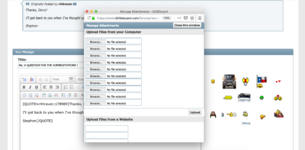
Thanks for allowing me access Gerry - OK I have taken a couple of screenshots from the original forum to illustrate the dialogue I used to seeing when uploading photos before:

Screenshot 1.jpg Screenshot 2.jpg

My browser is Firefox, not sure if that makes any difference. But that is how I had uploaded photos on the board. It allowed me to duplicate post recent photos without locating them, on having them on that particular PC to do so.

It’s not a huge deal, and I don’t want to put you to trouble over it! The new forum is MUCH faster uploading photos anyway so that is a very good improvement I am grateful for.
 
JC, what did you actually click to get to that window? I never experienced that !!

When in a thread, to reply I click “Go advanced”:

2-1.jpg

Then next I click, “Manage Attachments”:

2-2.jpg

And this extra dialogue then appears on the screen – in addition to the 500E board reply screen

20190411_185903.jpg
 
Interesting. I think this may be a setting that you can set up in your user profile/options. Never saw that before.

The good thing is that I am very very hot on the trail of a solution that should provide near, if not identical, functionality for this forum.

Stay tuned. Must.....keep......programming......code.......


P.S. Feel good going back to the old forum, like sitting in an old leather chair ?!? :stickpoke:
 
So, take this thread that we are in (BUG REPORTS DISCUSSION -- for new forum)...I would like to see the newest posts at the top of the page instead of at the bottom. Basically, the reverse of how posts are displayed now, newest posts at the bottom. So, if this post was the the most recent, it would show up at the top. Does that make sense?
I've done a fair bit of research on this.

Bottom line is that there is no "permanent," user-definable setting to do this, like there was in vBulletin.

The capability exists, but it must be enabled on a per-forum basis. What you do is in the thread display of a given forum, you click on "Filters" and then specify what you want (ascending or descending, etc.) and the forum will sort itself that way. Unfortunately this resets when the screen is refreshed.

Here's where the button is:


80826


I'm going to mark this one "Not a bug" as it is just not within the capabilities at the current time as a permanent user-controlled setting.

Cheers,
Gerry
 
Today, I'm working on creating code to import the "Thank Yous" from the old forum to the new forum, and assign them to the correct members.

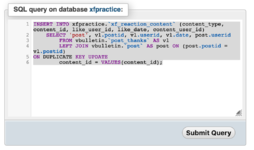
Again, a lot of hard-core coding, and I am practicing on a "temporary" copy of the forum database called "xfpractice."

You can see the SQL (structured query language) database code that I am working on to complete the practice import of the "Thank Yous."

Once I know it works on the practice database, I'll do it on the "real" database.

It may be a day or three until I get this right. Again, one space, quote mark, asterisk, semicolon or wrong character messes the whole thing up.

Cheers,
Gerry
 

Attachments

  • Screenshot 2019-04-17 10.18.11.png
    Screenshot 2019-04-17 10.18.11.png
    116.6 KB · Views: 5
Gerry, is it possible to tweak the Search box (standard, not advanced) to default to only displaying thread results, not every post within a thread? Currently it will return multiple results for a search term all within a single thread.

Example - this VIN search (link below) shows 2 results and there should only be 1 result, the primary thread link:
https://www.500eboard.co/forums/index.php?search/2568/&q=WDBEA36E8PB878084&o=relevance

With other search terms, sometimes the results are dozens or hundreds of results, often with many results all from the same thread. We only need the main thread in the initial results. We can then search *within* the thread, if it's long enough, to find the specific item.

:mushroom:
 
I'll see what I can do -- no promises. I believe it is designed to operate that way, though.

Basically the search engine goes through and finds all instances of a given search term. If it is in a thread multiple times, then it will pull up each instance of the phrase. This is not a bad thing, particularly for long threads in multiple screens, because it reduces the amount of hunting for the instance of the term. Meaning if there is a thread with 300 posts, and you are looking for the term "GVZ Law deferred maintenance", and it is in the thread in five posts, it will pull up all five posts rather than the generic thread (or first instance of the string in the thread), requiring you to tediously go through the entire thread to find the five posts out of 300 that contain the term that you searched for.

All this said, I was thinking of implementing an "auto-complete" function on the search, which is like Google in that it suggests/completes the term you are typing in as you type it into the search box.

Thoughts on a GVZ autocomplete?

🕵️‍♂️
 
Got it. However it can also be a bad thing, when there are pages and pages of results, most of which are all from the same 2 or 3 threads. I want to see those 2 or 3 results, not pages of stuff to sift through!

If a long thread has results, and you need to find 5 results within the 300 posts, you should be able to do a separate/second search WITHIN that thread to find out where it is. Yes, it would be a 2-step process, but IMO it would be much cleaner.

Autocomplete might be handy, but would need to try it out and see!

:pc1:
 
Have you tried playing around with options on the Advanced Search?
Yes, a little... but was hoping to make the "default" search box work better without having to use Advanced Search every time - many more clicks to go that route.
 
A couple of things to know, relating to search:

Search Modifiers:
+ = AND (default)
- = NOT
| = OR

You can (and should) also use quotes (") to do searches for phrases. This is similar to Google.

You can also use the wild-card term * (asterisk) in searches.
 
Today, I'm working on creating code to import the "Thank Yous" from the old forum to the new forum, and assign them to the correct members.

Again, a lot of hard-core coding, and I am practicing on a "temporary" copy of the forum database called "xfpractice."

You can see the SQL (structured query language) database code that I am working on to complete the practice import of the "Thank Yous."

Once I know it works on the practice database, I'll do it on the "real" database.

It may be a day or three until I get this right. Again, one space, quote mark, asterisk, semicolon or wrong character messes the whole thing up.

Cheers,
Gerry
I'm going to pick this back up. Several attempts and haven't solved it yet, but I'm trying like hell !! Custom MySQL query coding and some trial and error.
 
For some reason I am still getting partial image loads when using a mobile browser to view the forum. This happens inconsistently. For example, the first image will only show half of the image, while the second will load fine.

Screenshot examples attached:
 

Attachments

  • D0E1E8FE-DCEB-4D18-A771-27DD52AF1D6F.png
    D0E1E8FE-DCEB-4D18-A771-27DD52AF1D6F.png
    1.4 MB · Views: 2
  • 1401BEA7-33C2-4462-B2C6-286084574851.png
    1401BEA7-33C2-4462-B2C6-286084574851.png
    1.6 MB · Views: 2
For some reason I am still getting partial image loads when using a mobile browser to view the forum. This happens inconsistently. For example, the first image will only show half of the image, while the second will load fine.

Screenshot examples attached:
I don't believe this is a forum software issue -- rather an issue on your end of the connection. Try using another mobile browser on your phone or other device and see if the issue disappears.
 
I don't believe this is a forum software issue -- rather an issue on your end of the connection. Try using another mobile browser on your phone or other device and see if the issue disappears.


Thanks Gerry. I typically use Safari, so i downloaded mobile Chrome and it seems to act the same. For what its worth, it seems to affect new posts with photos most consistently. Once a photo has been uploaded for a given amount of time, it seems to load fine.

Examples from Chrome attached.
 

Attachments

  • 924E66C2-3967-4E40-A1DA-DCA80E12D306.png
    924E66C2-3967-4E40-A1DA-DCA80E12D306.png
    826.5 KB · Views: 1
  • 7085B969-26A8-4817-896A-4128EC3085B9.png
    7085B969-26A8-4817-896A-4128EC3085B9.png
    1.7 MB · Views: 1
Try it with desktop browsers and see what happens.

I haven’t ever experienced the same on desktop, but will report back if I do.

Are other mobile users not experiencing this? I can’t believe I’m the only one using an iPhone (if its somehow device specific)
 
Thanks Gerry. I typically use Safari, so i downloaded mobile Chrome and it seems to act the same. For what its worth, it seems to affect new posts with photos most consistently. Once a photo has been uploaded for a given amount of time, it seems to load fine.

Examples from Chrome attached.

Fyi, I see the same behavior on my iPhone with either Safari or Chrone. Desktop browsers work fine.
 
Fyi, I see the same behavior on my iPhone with either Safari or Chrone. Desktop browsers work fine.
I haven’t ever experienced the same on desktop, but will report back if I do.

Are other mobile users not experiencing this? I can’t believe I’m the only one using an iPhone (if its somehow device specific)
I've been using both my iPhone and iPad pretty regularly with the site in recent days and weeks, and haven't had any problems with things loading. Nor with my Mac Pro desktop or MacBook Pro laptop. Unfortunately I don't have a PC work computer anymore (traded it in for a new MacBook Pro per company policy) so can't tell anything on that platform. I am using FiOS broadband as home home connection.

I haven't seen this as an issue, but if more people report problems, I will definitely add it to the "Bug List" and begin an investigation to see if it is anything on the server side.

Cheers,
Gerry
 
Back
Top