• Hi Guest !

    Welcome to the 500Eboard forum.

    Since its founding in late 2008, 500Eboard has become the leading resource on the Internet for all things related to the Mercedes-Benz 500E and E500. In recent years, we have also expanded to include the 400E and E420 models, which are directly related to the 500E/E500.

    We invite you to browse and take advantage of the information and resources here on the site. If you find helpful information, please register for full membership, and you'll find even more resources available. Feel free to ask questions, and make liberal use of the "Search" function to find answers.

    We hope you will become an active contributor to the community!

    Sincerely,
    500Eboard Management

Number of posts stopped counting up?

Just a follow up, this do still vary on my account. Hard to say how often, maybe every 4-5. post doesn't count up. As mentioned above not a problem for me, but I guess for newcomers in case it happens to them as well.

1755176004049.png
 
It’s not a big deal but some posters don’t indicate what country they’re from and you could touch the flag and it would tell you.

I miss that feature. It’s a good lesson in flag recognition.
 
Not sure about the issue with post counts.

With regard to the flag issue, that is an add-on that is now not supported by the programmer anymore. The latest version of XenForo that we installed some weeks back (sort of) broke this add-on.

It works, but you have to wiggle your mouse around on their profile, and the flag will appear.

There's another add-on from another software author for this version of XenForo, and I will ask @xfadmin to install it and see if it restores the same/similar functionality.
 
With regard to the post count issue, I am in the process of rebuilding all post and thread-related caches in the background, to ensure that everything is set and accurate.

We are also rebuilding all forum and user caches as well.

The flag issue reported above, has now been remedied. It should no longer be an issue.
 
Maybe not related to the post counting issue, but the only thing I've noticed for a longer time is the error message shown below every time I log off. I have never denied any cookies request, so I don't understand what is expected for me to do. OTOH, I have no problem logging on and navigating on the forum.

IMG_0089.png
 
Maybe not related to the post counting issue, but the only thing I've noticed for a longer time is the error message shown below every time I log off. I have never denied any cookies request, so I don't understand what is expected for me to do. OTOH, I have no problem logging on and navigating on the forum.

View attachment 220919
This could be caused by several issues --

1) could be a browser / config issue

2) could be a forum config issue -- I made a very slight change to a control panel setting. Please let me know if you continue to see this problem.

3) could be because the forum has two URLs -- 500eboard.co and 500eboard.com -- and this could confuse a browser (though one domain resolves to the other), causing the browser to think there are two separate web sites, and thus having cookies stored for only one of them, throws up the error that it is expecting cookies for the other domain.

I believe the issue could be #1 or #2 above - thinking #1 as I know you have had browser related issues in the past per your corporate browser setup.

I don't typically log out of the site, but I will try doing this and seeing if the message pops up.


:update:
I just logged out of the site, and I didn't have any error message. Did have the "accept cookies" message at the bottom of the screen, as shown, though. But that's not an error message.

I will try logging out with other browsers and see if anything changes.

@xfadmin, also please try logging out and seeing if you observe any error messages.

 
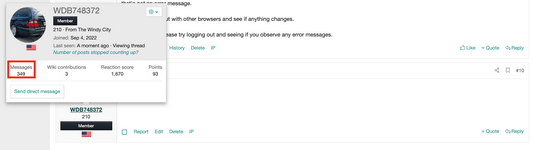
I believe the post number doesn't count towards owner threads. I intially started off with 348 messages:
1) Made a post on my owner's thread
2) Made a post on another owner's thread

Still the same post count

Made a post here (non owner's thread) and the post count went up
 

Attachments

  • Initiale.png
    Initiale.png
    113.1 KB · Views: 6
  • My_Owner_Thread_Post.png
    My_Owner_Thread_Post.png
    97.5 KB · Views: 6
  • Another_Owner_Thread_Post.png
    Another_Owner_Thread_Post.png
    99.3 KB · Views: 6
  • Non_Owner_Thread_Post.png
    Non_Owner_Thread_Post.png
    89.1 KB · Views: 6
I believe the post number doesn't count towards owner threads. I intially started off with 348 messages:
1) Made a post on my owner's thread
2) Made a post on another owner's thread

Still the same post count

Made a post here (non owner's thread) and the post count went up
That is EXCELLENT detective work, @WDB748372 !!

I went into the specific sub-forum settings, for this OWNER forum, and sure enough, there is a box that was UNCHECKED that says "count posts toward user's total."

I will go through all of the other sub-forums, and ensure that this box is indeed checked in them. A couple of other sub-forums I checked quickly DID have this box checked.

Thank you for figuring this out.

:update:
Going through each sub-forum's individual settings, the OWNER sub-forum was the ONLY one where the "count toward total" was NOT checked. All other forums are contributing toward user post count totals.
 
Last edited:
This could be caused by several issues --

1) could be a browser / config issue

2) could be a forum config issue -- I made a very slight change to a control panel setting. Please let me know if you continue to see this problem.

3) could be because the forum has two URLs -- 500eboard.co and 500eboard.com -- and this could confuse a browser (though one domain resolves to the other), causing the browser to think there are two separate web sites, and thus having cookies stored for only one of them, throws up the error that it is expecting cookies for the other domain.

I believe the issue could be #1 or #2 above - thinking #1 as I know you have had browser related issues in the past per your corporate browser setup.

I don't typically log out of the site, but I will try doing this and seeing if the message pops up.


:update:
I just logged out of the site, and I didn't have any error message. Did have the "accept cookies" message at the bottom of the screen, as shown, though. But that's not an error message.

I will try logging out with other browsers and see if anything changes.

@xfadmin, also please try logging out and seeing if you observe any error messages.
Many thanks for solving the issue, and to @WDB748372 as well for contributing to solve the mystery.🤝

As for my corporate browser issues, I don't work at that company any longer so I am now only using my private IP address, plus the iPhone. As long as it doesn't make any problems for me, I just ignore that error message.

Update: Just FYI - that error message suddenly disappeared on my iPad, do now persist on the iPhone only, but it doesn't mind me.
 
Last edited:

Who has watched this thread (Total: 3) View details

Back
Top