• Hi Guest !

    Welcome to the 500Eboard forum.

    Since its founding in late 2008, 500Eboard has become the leading resource on the Internet for all things related to the Mercedes-Benz 500E and E500. In recent years, we have also expanded to include the 400E and E420 models, which are directly related to the 500E/E500.

    We invite you to browse and take advantage of the information and resources here on the site. If you find helpful information, please register for full membership, and you'll find even more resources available. Feel free to ask questions, and make liberal use of the "Search" function to find answers.

    We hope you will become an active contributor to the community!

    Sincerely,
    500Eboard Management

View all threads where you have posted.

500AMM

500E explorer
Member
Gerry,

First - the new vBulletin platform seems fine, you have done, and are still doing a great job on this to make things better and safe. This is my first thread and it's a great surprise to find an improved layout for writing and posting - even with an auto save function too.

I haven't been looking so much on the new site yet, but immediately I don't find any button for viewing all threads where I have posted. This button was on top on the board index on the previous forum, and was a very nice function to get a fast update. Do you have plans for adding a similar function here too?

Many thanks!

-arnt-
 
OK, you must be talking about the "View Your Posts" link at the top right of the old forum. I haven't played with nearly all of the options on this board yet, because there are several times the number of options as existed on the old phpBB software. So I will check this out and let you know.

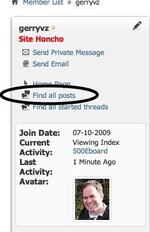
There is one pretty easy way to get this and this is to go to your own profile (either click on your name or click on the "My Profile" link at the top right of the screen).

Then you will see the profile page come up and then you can click on the link I circled to list your own posts. See the attached screen shot.

I will check about doing a short-cut link though. I am still tweaking A LOT of settings.... and this will continue for a while.

Cheers,
Gerry
 

Attachments

  • Screen Shot 2011-07-24 at 4.37.13 PM.jpg
    Screen Shot 2011-07-24 at 4.37.13 PM.jpg
    17.1 KB · Views: 7
Try Forum --> Quick Links --> Subscribed Threads.

:)
 
Dave, that only works if people actually DO subscribe to threads. This is an option that people can check or uncheck as a default (to subscribe to a thread that they participate in). With my answer to -arnt- I was assuming he WASN'T subscribing to threads as a default (I know I don't because I don't like the additional emails I receive).

Another method is in the "Advanced Search" link, where you can search posts by user and specify yourself. I did some checking and didn't see any sort of "one click" link to view your own posts like there was on the phpBB board forum-view page. I'll do some more checking and if this feature is not available, it probably IS available through a small "mod" which I'll try to find and implement.

Cheers,
Gerry


P.S. By the way -arnt- I was sorry to hear of the tragedy in your country over the weekend and imagine how much of a shock it must be to Norwegians to have this happen. I guess crazy "nutjob" guys with guns are everywhere in the world, not just here in the US. I wish for fast healing to the national mourning that I am sure all Norwegians are undergoing right now.
 
You can subscribe to threads without receiving the email notification - I don't receive the emails either. And you can set this as your default in the profile settings, so you don't have to choose it for each thread:

Top right of page - Settings --> Left nav - My Account --> General Settings --> Messaging & Notification --> Default Thread Subscription Mode.

I prefer the default of "Through my control panel only", this lets me find my subscribed threads when I go to the forum, with no email notifications. You can also choose an instant, daily, or weekly notification; or "do not subcribe".


:5150:
 
Many thanks for the feedback guys. I've seen the option on the profile page about listing all my posts, but it is time consuming to go through and sort out. I may sound lazy, sorry, but the "View Your Posts" button on the previous forum did only list all threads I've posted on, which gave a fast track and a good overview. Dave, I shall look closer on the proposed way from you too.

--------------
--------------
Norway terror attack. Many thanks for the compassion, Gerry. This is a horrible national tragedy, worst thing since the 2nd world war. Our country is paralyzed in deep shock, and most of the world too. How is it possible to build hate and ideologi so strong, make proper planning over years and go out and shoot young people, one by one. It was kids and youths from 12 years and up collected on a camp for young politicians. Traditionally it was held on that small island in a beautiful fjord. It is now 68 killed and still 5 missing, they've probably drowned in attempt to escape by swimming 700 meters from the island to the mainland. This fjord is deep and have quite cold freshwater even during the summertime, so with high adrenaline level and gunshot wounds, they had no chance to manage. 8 persons were killed in the bomb explosion in the government building in our capitol Oslo too, maybe all are government members. Additionally it is numbers of people heavily wonded in both attacks who will never recover. Norwegians are a warm and thoughtful people building relations on mutual respect and understanding, but this will change Norway to be more restrictive and make people reserved. However, we will go through this by standing closer to each other, and fight terror with a stronger democracy.

Best regards
Arnt
 
Last edited:
This is a horrible national tragedy, worst thing since the 2nd world war.
That is just so wrong on all levels, my deepest sympathies to your country and its people. I can't believe the cause stemmed from Islam immigration policies...in today's world. :wtf:
 

Who has viewed this thread (Total: 2) View details

Back
Top