

The replacement of the 500E/E500 front brake rotors is a job that is only done occasionally. The MB specification for rotor thickness is [TBD / varies with rotor size].
The job will take a first-timer around 1-1.5 hours per side; the second side generally goes faster. It is HIGHLY recommended to replace the brake pads and brake pad wear sensors at the same time the rotors are replaced. The job is around a 3 in difficulty on a 1-10 scale.
Tools Required:
Parts Required:
Before lifting your car's wheel off the ground, barely loosen all five of the lug bolts. You can use your lug wrench, or (as shown here) you can use an air-powered or battery-powered impact wrench.
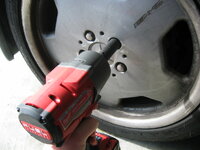
After breaking loose the lug bolts, carefully jack up the car in front, so that the front wheel is a couple of inches off the ground.

Finishing loosening and removing the five lug bolts, and remove the wheel from the car. Upon doing this, you will see this view of the disc and brake assembly.
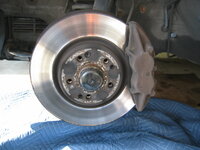
I decided to clean my lug bolts using a wire wheel, to remove rust and surface corrosion from the bolts. You can see the process of doing this in the photos below. Of course, this is optional, but it helps neaten things up.
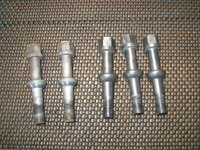

The next step is to remove the caliper. It is held onto the car by two 19mm bolts, which are accessed from behind the wheel. I used a 1/2" drive socket with a six-point short socket. It may take some effort to break these bolts free. A few blows with a hammer on the end of the ratchet can help break them loose. Make sure your socket has a GOOD purchase on the head of the bolt.

Upon removing the bolts, you will see that they have Blue Loctite on the ends of them. I used my wire wheel to remove this old Blue Loctite.

Another view, removing the second (uppermost) of the two bolts that hold the caliper to the car.

Then, unplug the two brake pad wear sensors from the electrical connector behind the caliper.

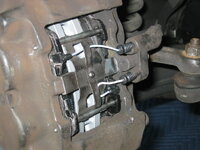
Using your punch and a hammer, hammer the ends of the two brake pad retaining pins inward, driving them out of the calipers. Once they are mostly released, use your needle-nose pliers to remove them from the calipers from the rear side, as shown in the second photo.
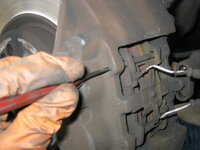

After removing the retaining pins, the brake pad retaining spring will be loosened. Remove it from the car, and set it and the pins aside for cleaning.

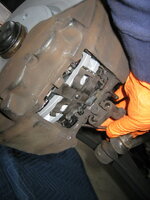
Using your channel-lock pliers, carefully and slowly squeeze the tabs of each brake pad toward the outside of the caliper. This compresses the pistons and allows the removal of the brake pad, as shown in the second photo below. Repeat for the other brake pad.

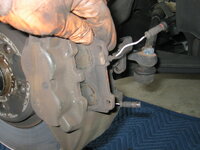
From there, you can lift the caliper off of the brake rotor. Using your bungee cord, or a piece of coat hanger wire, suspend the caliper from the inside of the wheel well, so that you are not stretching or stressing the brake line.


Here is what the bare brake rotors looks like, after caliper removal.

Find the 5mm Allen screw that holds the rotor to the hub. Using your Allen socket or Allen key, remove the screw from the rotor. It should not be very tight. Note that it also has Blue Loctite on its end, as show in the third photo below.

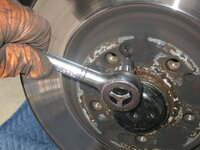
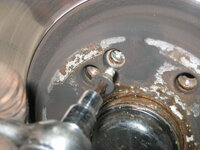
With the retaining screw removed, the rotor should loosen and slide right off of the hub, as shown in the two photos below. There is a chance, if the car has been driven on salty roads in the winter, that the rotor hat is rusted to the inside of the hub. If the rotor doesn't come off of the hub easily, you can bang it from behind with your hammer (while rotating it) to loosen it and coax it to come off of the hub.
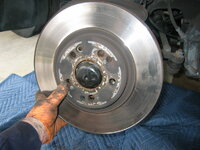

Here is what the hub looks like, with the rotor removed. Note the two metal guide pins embedded into the hub. These press into the rotor and hold it into place.

Here are a couple of views of the brake pad. Notice that there was plenty of wear left on it. The second photo shows it was a Jurid brand pad.

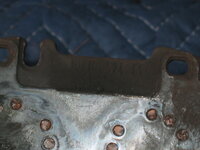
Using a wire brush (brass or steel), brush off the surface of the hub, where it contacts the metal of the rotor hat.


After you brush the hub surface, coat it with a light, thin layer of anti-seize paste. This will make it much easier to remove the rotor the next time it needs to be replaced.

Next, it is time to install the new rotor. On my car, the front rotors are different part numbers on the left and right sides, hence I have marked the part boxes "driver" and "passenger" side. Early 500Es up to about mid/late-1993 I believe use the the same part number for both rotors. You will need to ascertain what rotors your car requires. The "directional" rotors are for the facelift cars with the larger 320mm front brakes from the SL600.


A comparison of the old (top) and new (bottom) rotors. Note that like the factory rotors, the ATE branded rotors I used are also painted gray. This gray coating wears off after just a few applications of the brakes.

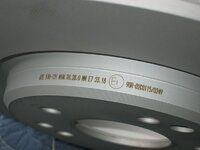
The ATE rotors also have the wear spec etched onto the hats, in two different places.
Install the new rotor onto the hub, lining up the appropriate alignment pins and the hole for the retaining screw.

Here is my cleaned up hardware, ready for the installation. You can see where I added Blue Loctite to the ends of the retaining screw and the caliper bolts.


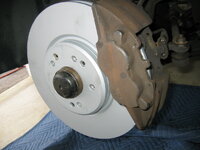
Place the caliper onto the rotor in proper position, and insert and tighten the 5mm Allen retaining screw. The torque spec for this 5mm Allen retaining screw is 10Nm. Then, install and tighten the bolts into the rear of the caliper that hold it to the car. The torque spec for these two 19mm brake caliper bolts is 115 Nm (quite tight).



Carefully press the pistons back into the calipers, one side at a time. This will make room for the new brake pads to be installed. Before you install the pads, make sure you smear the rear of each pad with a layer of silver MB brake paste. Also coat the edges of the metal pad backing plates with brake paste, where they contact the insides of the calipers. This will help prevent squeaking.

Re-insert the pins and the brake pad retaining spring from the rear side, and pound them back into place.

Once the pads are in place, install the two new brake pad wear sensors. It is advisable not to re-use the old sensors, though it is possible to do this in a "pinch." This is a cheap part, so advisable to purchase them in advance.


Once the caliper is installed, and the brake pads are installed, it is HIGHLY ADVISABLE to check the rotor for runout. I used my dial gauge to measure this. The MB factory spec is 0.12mm runout. My measurement with the new rotor was 0.025mm runout on both the rotor braking surface and the rotor hat, which was well below the MB factory spec (as it should be for a new rotor).


The last thing I did, which I did during the entire job, was to clean the removed wheel with water and Griot's Garage Heavy-Duty Wheel Cleaner. I did three applications to the front and back of the wheel. Though it didn't clean up 100%, particularly on the rear, it certainly looks MUCH better than it did before. This is the front of the wheel. It is going to need refinishing again in the future, as I am JUST starting to see the paint beginning to peel.

From there, I just re-installed the wheel onto the car, and tightened down the lug bolts. Job complete.
I hope this HOW-TO is helpful for those replacing their front pads and rotors.
The job will take a first-timer around 1-1.5 hours per side; the second side generally goes faster. It is HIGHLY recommended to replace the brake pads and brake pad wear sensors at the same time the rotors are replaced. The job is around a 3 in difficulty on a 1-10 scale.
Tools Required:
- 19mm socket (6-point preferred), 1/2" drive
- 1/2" drive ratchet
- Channel-lock or other slip-jaw pliers
- Hammer
- Punch
- Needle-nose pliers
- Bungee cord or coat hanger
- 5mm Allen socket or Allen key
- Dial gauge and dial gauge holder
- Lug wrench
- Brake cleaner
- Rags
- Blue thread-locker
- Floor jack
- Brake paste
Parts Required:
- Brake rotors (pair; appropriate for your car)
- 129 421 20 12 64 (both sides, for cars with VIN B930494 and lower)
- 129 421 17 12 64 (front left, for cars with VIN B930495 and higher)
- 129 421 18 12 64 (front right, for cars with VIN B930495 and higher)
- Front brake pads 005 420 02 20 41 (set of four; appropriate for your car)
- Brake pad wear sensors 140 540 12 17 (four needed)
Before lifting your car's wheel off the ground, barely loosen all five of the lug bolts. You can use your lug wrench, or (as shown here) you can use an air-powered or battery-powered impact wrench.
After breaking loose the lug bolts, carefully jack up the car in front, so that the front wheel is a couple of inches off the ground.
Finishing loosening and removing the five lug bolts, and remove the wheel from the car. Upon doing this, you will see this view of the disc and brake assembly.
I decided to clean my lug bolts using a wire wheel, to remove rust and surface corrosion from the bolts. You can see the process of doing this in the photos below. Of course, this is optional, but it helps neaten things up.
The next step is to remove the caliper. It is held onto the car by two 19mm bolts, which are accessed from behind the wheel. I used a 1/2" drive socket with a six-point short socket. It may take some effort to break these bolts free. A few blows with a hammer on the end of the ratchet can help break them loose. Make sure your socket has a GOOD purchase on the head of the bolt.
Upon removing the bolts, you will see that they have Blue Loctite on the ends of them. I used my wire wheel to remove this old Blue Loctite.
Another view, removing the second (uppermost) of the two bolts that hold the caliper to the car.
Then, unplug the two brake pad wear sensors from the electrical connector behind the caliper.
Using your punch and a hammer, hammer the ends of the two brake pad retaining pins inward, driving them out of the calipers. Once they are mostly released, use your needle-nose pliers to remove them from the calipers from the rear side, as shown in the second photo.
After removing the retaining pins, the brake pad retaining spring will be loosened. Remove it from the car, and set it and the pins aside for cleaning.
Using your channel-lock pliers, carefully and slowly squeeze the tabs of each brake pad toward the outside of the caliper. This compresses the pistons and allows the removal of the brake pad, as shown in the second photo below. Repeat for the other brake pad.
From there, you can lift the caliper off of the brake rotor. Using your bungee cord, or a piece of coat hanger wire, suspend the caliper from the inside of the wheel well, so that you are not stretching or stressing the brake line.
Here is what the bare brake rotors looks like, after caliper removal.
Find the 5mm Allen screw that holds the rotor to the hub. Using your Allen socket or Allen key, remove the screw from the rotor. It should not be very tight. Note that it also has Blue Loctite on its end, as show in the third photo below.
With the retaining screw removed, the rotor should loosen and slide right off of the hub, as shown in the two photos below. There is a chance, if the car has been driven on salty roads in the winter, that the rotor hat is rusted to the inside of the hub. If the rotor doesn't come off of the hub easily, you can bang it from behind with your hammer (while rotating it) to loosen it and coax it to come off of the hub.
Here is what the hub looks like, with the rotor removed. Note the two metal guide pins embedded into the hub. These press into the rotor and hold it into place.
Here are a couple of views of the brake pad. Notice that there was plenty of wear left on it. The second photo shows it was a Jurid brand pad.
Using a wire brush (brass or steel), brush off the surface of the hub, where it contacts the metal of the rotor hat.
After you brush the hub surface, coat it with a light, thin layer of anti-seize paste. This will make it much easier to remove the rotor the next time it needs to be replaced.
Next, it is time to install the new rotor. On my car, the front rotors are different part numbers on the left and right sides, hence I have marked the part boxes "driver" and "passenger" side. Early 500Es up to about mid/late-1993 I believe use the the same part number for both rotors. You will need to ascertain what rotors your car requires. The "directional" rotors are for the facelift cars with the larger 320mm front brakes from the SL600.
A comparison of the old (top) and new (bottom) rotors. Note that like the factory rotors, the ATE branded rotors I used are also painted gray. This gray coating wears off after just a few applications of the brakes.
The ATE rotors also have the wear spec etched onto the hats, in two different places.
Install the new rotor onto the hub, lining up the appropriate alignment pins and the hole for the retaining screw.
Here is my cleaned up hardware, ready for the installation. You can see where I added Blue Loctite to the ends of the retaining screw and the caliper bolts.
Place the caliper onto the rotor in proper position, and insert and tighten the 5mm Allen retaining screw. The torque spec for this 5mm Allen retaining screw is 10Nm. Then, install and tighten the bolts into the rear of the caliper that hold it to the car. The torque spec for these two 19mm brake caliper bolts is 115 Nm (quite tight).
Carefully press the pistons back into the calipers, one side at a time. This will make room for the new brake pads to be installed. Before you install the pads, make sure you smear the rear of each pad with a layer of silver MB brake paste. Also coat the edges of the metal pad backing plates with brake paste, where they contact the insides of the calipers. This will help prevent squeaking.
Re-insert the pins and the brake pad retaining spring from the rear side, and pound them back into place.
Once the pads are in place, install the two new brake pad wear sensors. It is advisable not to re-use the old sensors, though it is possible to do this in a "pinch." This is a cheap part, so advisable to purchase them in advance.
Once the caliper is installed, and the brake pads are installed, it is HIGHLY ADVISABLE to check the rotor for runout. I used my dial gauge to measure this. The MB factory spec is 0.12mm runout. My measurement with the new rotor was 0.025mm runout on both the rotor braking surface and the rotor hat, which was well below the MB factory spec (as it should be for a new rotor).
The last thing I did, which I did during the entire job, was to clean the removed wheel with water and Griot's Garage Heavy-Duty Wheel Cleaner. I did three applications to the front and back of the wheel. Though it didn't clean up 100%, particularly on the rear, it certainly looks MUCH better than it did before. This is the front of the wheel. It is going to need refinishing again in the future, as I am JUST starting to see the paint beginning to peel.
From there, I just re-installed the wheel onto the car, and tightened down the lug bolts. Job complete.
I hope this HOW-TO is helpful for those replacing their front pads and rotors.
Last edited:


