• Hi Guest !

    Welcome to the 500Eboard forum.

    Since its founding in late 2008, 500Eboard has become the leading resource on the Internet for all things related to the Mercedes-Benz 500E and E500. In recent years, we have also expanded to include the 400E and E420 models, which are directly related to the 500E/E500.

    We invite you to browse and take advantage of the information and resources here on the site. If you find helpful information, please register for full membership, and you'll find even more resources available. Feel free to ask questions, and make liberal use of the "Search" function to find answers.

    We hope you will become an active contributor to the community!

    Sincerely,
    500Eboard Management

Re-using the ceiling AMPS phone control buttons for modern phone / bluetooth controls

Jlaa

Nitpickio🛡️Maximus
Staff member
The old AMPS phone control buttons represent a wasted opportunity. So many glorious buttons up there on the ceiling, flashing indicator lights, and a microphone --- all wasted because AMPS analog phone service no longer exists. I decided to do something about it.

IMG_8261.jpeg IMG_8274.jpeg

I consulted with @darek_u who has modified the original control board and soldered button contacts to a commercially available bluetooth handsfree device and garage door opener. The original circuit board is below:
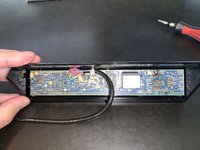
IMG_8266.jpeg IMG_8269.jpeg

I decided to rule out just repurposing the buttons / microphone and soldering the ceiling button contacts to some commercially available bluetooth hands free device. The reason why I ruled this out was because:
  • I wanted to use ALL the Mercedes ceiling buttons, not be constrained with the buttons that a commercially available HF device gave me.
  • I wanted to control the indicator lights in the ceiling button panel --- I wanted maximum use of the ceiling panel.
The end result I envision for the buttons are:

[EDIT - I am editing the button states / LED states below as I write the code and find corner cases]
  • SEND Button -> Accept call
  • M1 Button -> Decrease Volume
  • M2 Button -> Increase Volume
  • D Button -> Short Press = Cycle through Connect / Disconnect the currently paired BT device. BT devices are sometimes finicky and aren't always connected when you expect them to be. So, I will use the button to give the user the option force a connection if need be, without having to powercycle the thing. I anticipate this function to be seldom used. Long Press = Pair New Device
  • END Button -> Short Press = Hangup call. Long Press = Power Down.
The end result I envision for the lights are:
  • Dot -> Solid Green - signifies power on / power off
  • "In Use" -> Solid Blue - A BT device has been paired and connected.
  • "In Use" -> Flashing Blue - The unit has entered pairing mode
  • "Roam" -> Solid Yellow - A BT device has been paired but is currently NOT connected. This might happen if you forgot to bring your phone with you in the car, or if you have bluetooth on your phone turned off.
  • "No Svc" -> Solid Red - No BT device has been paired.
 
Last edited:
Because of this totally custom approach, I decided to embark on a solution that consists of two parts:
  • A custom PCB that would sit behind the rubber ceiling buttons with micro-buttons and LEDs that I would control
  • A little computer that would have an integrated bluetooth chipset and audio in/out capability that would interface with the buttons. Since I would be using a computer, I would have consummate flexibility to do whatever I wanted to do --- Software Defined Buttons -- hahaah.
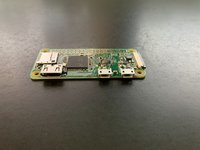
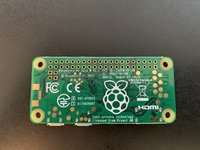
Enter the Raspberry Pi 0W. It is tiny ARM-based computer that runs its own flavor (Raspbian) of Debian Linux. It has integrated WiFi and BT. It costs around $10.

IMG_8323.jpeg IMG_8324.jpeg IMG_8325.jpeg IMG_8327.jpeg

My first step was to get the right code on this thing to BT pair with my phone. Since I would be running the device headless (no keyboard, no monitor), I followed these instructions to start: Setup Pi Zero W Headless Wifi

And then used this get the Pi 0W to pair with my phone and start making calls: Enabling Hands-Free Profile on Raspberry Pi (Raspbian Stretch) by using PulseAudio

After spending a few weeks with this approach, I learned a couple of things:
  • The built in BCM Broadcom 20702 bluetooth chipset is extremely problematic and correctly functioning drivers are extremely hard to find.
  • Even if you can get the BCM20702 chipset to work and pair with your phone, the audio sounds like crap --- like you are speaking thorough a static filled line while someone is scratching a needle across a record, constantly, at 140 db. The audio is unusable.
  • The reason why this is is because of the way one of the open source packages, pulseaudio, implements the HSP Audio routing. When two Bluetooth enabled devices establish a HSP Audio link, the data is exchanged by means of Synchronous Connection Oriented (SCO) packages. This is a real-time narrow-band protocol without package retransmission suitable for Bluetooth voice exchange. The synchronization between the transmitting and receiving parts is made by sending one SCO package per received SCO package. This all works perfectly if both packages have same or very similar size, however Pulseaudio hard codes the SCO package size to 48 bytes, while the controller from the Raspberry Pi negotiates a package size of 60 bytes. This mismatch causes the terrible audio.
  • I had to recompile all the various software packages to use 48 byte SCO package sizes. This worked great.....super clear audio.

But then I had crazy echo during Bluetooth calls. There is an echo cancellation software module that can be loaded with pulseaudio, but every time I loaded it, pulseaudio would crash, and the logfiles would only show one cryptic message --- "ILLEGAL OPERATION". This went on for WEEKS. Phone calls with echo are annoying as all get out and no matter what I did, I couldn't get rid of it......
 
Last edited:
Enter my next approach --- let's use a Raspberry Pi4. This is more costly - $35. Further, the size is a bit bigger so this will have to live outside the Mercedes controlpanel housing and inside a little plastic box sitting between the headliner and the steel roof. The ARM architecture on the Pi4 is a bit different --- The Pi4 is ARMv7 and the Pi0W is ARMv6. That solved my "ILLEGAL OPERATION" issues when using the echo cancellation module. Hallelujah! Clear bluetooth phone calls with excellent audio quality!

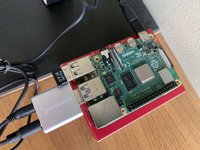
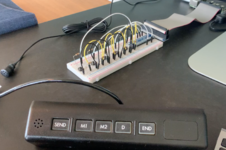
OK, some pictures below of what's going on --- I have the Pi4 computer. It has a USB Bluetooth radio plugged into a USB port (so that I can avoid on-board BT chipset goofiness). It also has a USB audiocard plugged in, and from that audio card, audio output goes to a small test speaker. A microphone is plugged into the audio-in port of the USB audio cards.

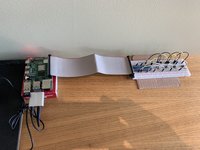
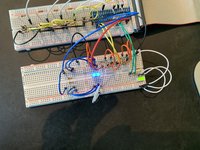
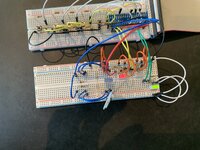
I also have a prototype 5-button control panel on a breadboard (the white thing), which interfaces with the Pi4 using the GPIO pins.


IMG_8512.jpeg IMG_8539.jpeg IMG_8551.jpeg 1593278181421.png
 
Last edited:
If the nerds had their own secret club, you would be the president. This is amazing.

What microphone and speaker would be used during a call?
 
If the nerds had their own secret club, you would be the president. This is amazing.

What microphone and speaker would be used during a call?

Hah! I take that as a compliment I think? 🤣

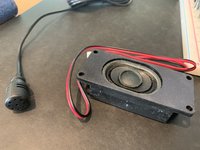
The microphone will be this one --- it is some generic el-cheapo microphone that I had laying around. It fits inside the Mercedes controlpanel housing and works fine. I realized its not really the hardware that matters so much anyways, the biggest difference is the efficacy of the noise-suppression and echo-cancellation algorithms implemented in software (which these days is so readily available ---- not so back in 1993!).

The speaker I will have to figure out. If I were super ambitious, what I would do is to use the pi4 to route the phone audio to the stereo amplifier in the trunk as well as simultaneously turning the amp on with a +12v signal. I may not be that ambitious though. A 3 watt speaker placed up near the sunroof switch area / phone control panel housing may work just fine for phone calls.....

IMG_8567.jpeg
 
The speaker I will have to figure out.
Does Pi4 have any analog outputs? Something that can be used to drive relays? If so - why not use Becker Mute function and front speakers for audio?
 
Does Pi4 have any analog outputs? Something that can be used to drive relays? If so - why not use Becker Mute function and front speakers for audio?

Oh man. That's a great idea --- will have to be a later phase. The stock driver's side dash speaker is a dual voice coil speaker to handle telephone operations, and can thus take advantage of the Becker Mute function. My aftermarket speakers are single voice coil. As well, the pi4 has only digital outputs, but it can drive relays with digital output as well.

I have made a lot of progress and finished coding all the bluetooth functions. Now I understand why every single commercial bluetooth device you buy is always varying degrees of "finicky" ---- all the open source stuff for bluetooth is finicky, buggy, and I spent 90% of my time empirically determining various states and devising brute force approaches to trying to make bluetooth pairing / etc as reliable as possible --- i.e. bouncing the Linux bluetooth service after certain operations like flushing the pared-table cache, etc.

Now I also know why all these commerical bluetooth hands-free and audio solutions don't give you many buttons for connecting / disconnecting as well as pairing / unparing / etc. Because all that shit is kinda buggy as all hell, so the manufacturers figure they will give you minimal buttons to ensure you get in as little trouble as possible ----- like a bluetooth speakers that requires off / on power-cycle to re-pair --- well no shit, a power cycle will get rid of any bad states prior to pairing!

Anyways, the code was just an exercise in trying to recover from bad states all round ---- two videos:

First one shows the the LED functions, making a call, and ending the call with the following light states:
  • Dot -> Solid Green - signifies power on / power off
  • "In Use" -> Solid Blue - A BT device has been paired and connected.
  • "In Use" -> Flashing Blue - The unit has entered pairing mode
  • "Roam" -> Solid Yellow - A BT device has been paired but is currently NOT connected. This might happen if you forgot to bring your phone with you in the car, or if you have bluetooth on your phone turned off.
  • "No Svc" -> Solid Red - No BT device has been paired.

Second video shows bluetooth pairing and repairing --- this was tedious to make it reliable.


Now comes the hard part which will take a loooong time since I have very little experience at it --- the mechanical part. I will have to package this all on a PCB and make it fit.
 
Well, I have single cone speakers in the dash (rainbows) and still use them for HF. My hands free system has build in relays that cut off signal from factory amp (physically disconnect +/- signal for the speakers) and uses the build in small digital amp to play the telephone conversation. Becker mute function kills the sound in rear speakers. On a side note I've never checked what MUTE does - shuts down the power to amps or just cuts off the audio signal to the speakers. So theoretically you could wire in left front speaker to your HF system through 2 relays, same signal that drives relays could activate mute function. Just a food for thought...
 
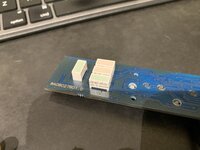
Update - using el-cheapo generic LEDs like in my pictures / videos above proved to be suboptimal. The reason is because the "In Use", "Roam", and "No Svc" lights are clear plastic. There is no light pipe behind them. Motorola made this text light up nicely, with even lighting, using 5mm x 10mm rectangular "Single Bar LED" utilizing a SIP pin configuration - as below.
IMG_8649.jpeg

The rectangular and diffuse nature of these specialty LEDs makes for nice, even lighting. Using el-cheapo generic LEDs like in my previous posts looked cheesy when placed behind the "In Use" / "Roam" / "No Svc" clear plastic.. The above pictures shows QLMP 2513s manufactured by HP as mounted on the original PCB. These have been obsolete a long long time, and among other things, they are not RoHS compliant.

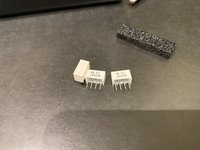
I was, however, able to source Red, Yellow, and Green ones, updated for modern times by being RoHS compliant. I got a selection of these from Avago, King Bright, and Everlight --- all three of these manufacturers make these things. Example below. Each of these have two LED chips on them and you have to drive both to have it look good.
IMG_8648.jpeg

However, no one makes these in blue. I found I could gang up four discrete rectangular LEDs and drive them with only 0.6mA each to get the approximation of a 2-chip single bar package.

IMG_8651.jpeg IMG_8652.jpeg IMG_8653.jpeg IMG_8654.jpeg
 
Last edited:
Such an epic mod! I was looking at mine the other day and thinking, man, surely there must be a way...maybe with a Raspberry Pi? Somewhat overkill - it's a powerful little thing - but it has the size and adaptability for the job.

And that's about as far as my thoughts went: in this case I'm all theory and no practice, so it's great to see this being built out in this post, rather than "what if" theorizing.
 
Last edited:
Such an epic mod! I was looking at mine the other day and thinking, man, surely there must be a way...maybe with a Raspberry Pi? Somewhat overkill - it's a powerful little thing - but it has the size and adaptability for the job.

And that's about as far as my thoughts went: in this case I'm all theory and no practice, so it's great to see this being built out in this post, rather than "what if" theorizing.
Hah, this is my first jump from personally being all theory into practice!
 
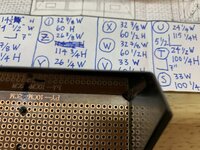
I was hoping that I could take the easy way out and hand solder all the components onto perfboard. Perboard has holes that are all 0.1in apart.

I will not be able to use perfboard because the hole spacing is too coarse. See picture below. I am not able to duplicate the spacing between these LED components. I will have to try and draw up my desired printed circuit board and get it printed. I've never done this before in practice, so this will be an interesting learning experience.

IMG_8693.jpeg IMG_8676.jpeg IMG_8681.jpeg IMG_8682.jpeg

Also, the pi uses a 40 pin header. Geez the ribbon cable for that thing is massive. Not sure if there is a way to "convert" a 40-pin header to something more compact.... now I have an appreciation for why Apple deleted the headphone jack on their iphones in the last few years...

1594190051537.png

I should also note something interesting ---- kind of like a parallel between electrical components a the dynamic among OE / OEM / and Meyle / Febi junk parts.

I ordered a bunch of HLMP 2300 (red), 2400 (yellow), and 2500 (green) LEDs from Broadcom/Avago, Kingbright, and Everlight. Wouldn't you know it, the Broadcom stuff is all like 2x the price of the other brands (like $2 instead of $1 per part), but the Broadcom stuff is consistently brighter for the same amount of current and has thicker pins.

Example:
HLMP-2300 Broadcom Limited | Optoelectronics | DigiKey $2.22

HLMP2300 Everlight Electronics Co Ltd | Optoelectronics | DigiKey $0.82
 
Last edited:
Accept! Blast from the past. I didn't know there was a short version... full version is almost 6 minutes. :gsxrock: :deniro:

Also didn't know Fozzy did a cover of this song. Thanks, You Tube 'Up Next'!

 
Quick Update -- In the circuit diagram I added a provision for the 6 tiny little LEDs that backlight the buttons. I also ordered these little LEDs from Mouser (a couple of cents each) so that when I receive them, I can add them to the breadboard and test.

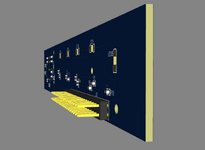
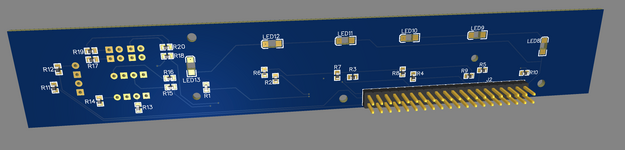
Then I watched a bunch of youtube videos and learned EasyEDA, and I laid out the PCB. The trickiest thing was (a) having to draw my own footprints for some of the components and (b) figuring out how to do reverse-mounted (bottom access) LEDs. Reverse mounted LEDs are for the 6 tiny LEDs that backlight the buttons. They are mounted on one side of the board, but shine down, through little holes in the board so that they can light up the semi-translucent rubber/siliconized/whatever buttons.

So on the hardware side, all I need to do is verify that the reverse mounted LEDs work as I intend them to (6 in total, 2x 3 mounted in series without any resistor). I might have to fine tune it a little bit by adding a small resistor and / or change it to 3x 2 mounted in series with a resistor.

After I prove that all works, I can send the PCB design out for fabrication.

On the software side, I started stress testing my software package for bluetooth handsfree HFP profile (as opposed to feature testing). This is basically Debian Linux (Raspberry Pi OS) using pulseaudio, ofono, bluez, and alsa. I realized that phone calls work great until about the 5 minute mark, when the echo-cancellation module crashes. Once the sw-echo-cancellation module crashes, the other side hears TONS of echo and its impossible to continue with the phone call. Argh. That software stack is so buggy.

Screen Shot 2020-07-11 at 11.09.47 AM.png Screen Shot 2020-07-11 at 11.10.10 AM.png Screen Shot 2020-07-11 at 11.13.19 AM.png
Screen Shot 2020-07-11 at 11.13.36 AM.png Screen Shot 2020-07-11 at 11.14.04 AM.png Screen Shot 2020-07-11 at 11.14.21 AM.png
 
Last edited:

Who has viewed this thread (Total: 1) View details

Who has watched this thread (Total: 2) View details

Back
Top