• Hi Guest !

    Welcome to the 500Eboard forum.

    Since its founding in late 2008, 500Eboard has become the leading resource on the Internet for all things related to the Mercedes-Benz 500E and E500. In recent years, we have also expanded to include the 400E and E420 models, which are directly related to the 500E/E500.

    We invite you to browse and take advantage of the information and resources here on the site. If you find helpful information, please register for full membership, and you'll find even more resources available. Feel free to ask questions, and make liberal use of the "Search" function to find answers.

    We hope you will become an active contributor to the community!

    Sincerely,
    500Eboard Management

FYI Technical Site News (for those interested)

We will be performing a XenForo forum software upgrade, from 2.3.7 to 2.3.8, later today at 5:00 PM EST.

The forum will be suspended for approximately 15-20 minutes during this time, mainly to perform a "snapshot" backup and then the software update.
The update was successful.

However, it took quite a bit longer than necessary, because the snapshot backup, which usually takes 5-7 minutes, ran 90 minutes and STILL didn't complete. We finally just proceeded with the upgrade.

All's well; carry on.
200.gif
 
I instituted several more software upgrades over the past hour -- including to the final version of XenForo 2.3.8 (the previous version that @xfadmin did recently was a "preview" version), as well as upgrades to the Enhanced Search capability, and the Media Gallery.

I also had to solve a slight, but common problem that stemmed from the recent Ubuntu operating system upgrade. That problem was a permissions issue that was not allowing easy software upgrades from within the XenForo control panel. Fortunately with a few geeky commands relating to permissions and directory ownership, and some testing, I was able to resolve the issue and all is well in the XenForo admin world again.

No forum downtime for any of this, just all done in the background.

Of interest to folks, the new update 2.3.8 will provide higher resolution "thumbnail" images for photos and attachments, which will be especially welcome for folks on mobile devices. This will apply to all new attachments going forward.

For the 300,000 existing attachments and photos, I am currently in the process of rebuilding the attachment thumbnails to higher resolutions. This is a process that is likely going to take 6-8 hours, but it will run on the server in the background and will not affect forum operations at all. Hopefully when things are done, folks will begin to notice some changes. Maybe not, though.

XenForo has been promising version 2.4 now for more than 18 months, and the natives are beyond restless. They vastly overpromised and have under-delivered on this. They are still saying it is coming in the not-too-distant future, but are declining to give any time frame. Maybe in 2026?!? We'll see.

In the meantime they threw this 2.3.8 bone to appease folks. 2.4 is going to be a pretty significant upgrade, though.

When we started this forum on XenForo in March 2019, they had just released 2.1.0 a few weeks prior. So literally in 6+ years, they have only issued two "major" releases of XenForo and lots of incremental "point" releases, of which this latest 2.3.8 is. Typically these tend to be bug-fix updates, with an occasional new feature or two thrown in (such as the higher-res thumbnails).
 
Last edited:
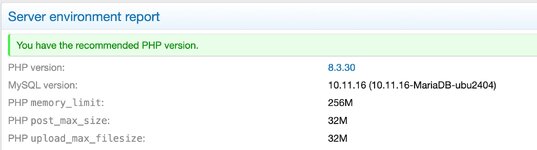
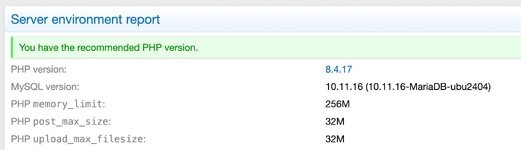
This morning we did a switchover of our php language from version 8.3.30 to 8.4.17.
Screenshot 2026-02-17 at 1.20.26 PM.jpg

Screenshot 2026-02-17 at 1.23.34 PM.jpg

php is the language that much of the XenForo forum software code uses. Version 8.3 was first released at the end of November, 2023, and active support of 8.3 ended in November, 2025. Security patch support does extend through December 31, 2027.

Version 8.4 was released in November, 2024, and is actively supported through November 2026, with security patches extending through December 31, 2028. It is the current "sweet spot" for XenForo installations. The current version of php 8.4 is 8.4.18, which was released on February 12th (last week). However, @xfadmin won't upgrade from 8.4.17 (released January 15th, 2026) likely until the end of this week, or the weekend.

php 8.5 was released in November 2025, and is currently on 8.5.3 (released last week, also 12-Feb). We won't "upgrade" to 8.5 until likely about a year from now, because many of the XenForo add-ons that we use to provide additional functionality to the site, aren't (yet) tested and compatible with php 8.5.
This is all part of the ongoing back-end maintenance and updates that happen with the site several times a week, to keep things running smoothly, and future-proofed. Using php 8.4 will put us in a very good technical position for upcoming upgrades to the XenForo software -- which they keep promising will be a big upgrade in the "near future" to version 2.4. Of course, they've been saying this for more than 1.5 years now.....
 
It appears that the storage volume that contains all large attachments, has become detatched from the main 500Eboard server. Not sure how this happened, other than we did our regular monthly reboot of the system yesterday.

Since the forum/server can't find this storage drive that contains all of the large attachments, it won't display them.

The thumbnail images are stored on the main 500Eboard server, so they are displaying just fine.

This is going to require a bit of diagnostic work to determine what the issue is, but sadly I won't be able to get to it until next weekend.

Again, all thumbnails should display just fine.

Separately, since the reboot, all of the NEWLY attached large images are being stored on the main 500Eboard server, so newer posts from the past day or so with attachments, should display the large images just fine.

When we are able to re-attach the image drive to the server, we will move the newly stored large images to this storage volume.

This problem came at a really bad time, as I'm out for the entire coming week. I'll do my best to try to find time to diagnose and solve the issue.

Thanks
Gerry
 
@gerryvz,
Gerry, I’m having trouble expanding thumbnails on my I-Phone 13. This just started about a week ago maybe a little longer. Some open but most do not.

It’s kinda PITA. The only work around is to stretch the thumbnail w/ fingers but doing that does not actually allow the full pic to show.

Is this what you’re talking about in post #255 above?

PS; I haven’t been using my laptop so I don’t know if it would do the same.
 
@gerryvz,
Gerry, I’m having trouble expanding thumbnails on my I-Phone 13. This just started about a week ago maybe a little longer. Some open but most do not.

It’s kinda PITA. The only work around is to stretch the thumbnail w/ fingers but doing that does not actually allow the full pic to show.

Is this what you’re talking about in post #255 above?

PS; I haven’t been using my laptop so I don’t know if it would do the same.
Yes Terry, it is the same issue.
 
All:

I have diagnosed the issue with the storage volume containing all of the large attachments. The volume is fine and no data has been lost.

What happened was when we did the system reboot back on March 7, the operation “broke” the linkage that mounted the storage volume to the 500Eboard server.

So when the system reboot was complete, the broken link kept the volume from automatically mounting and providing the images to the server.

The forum software then defaulted to the “stock” configuration and began using the main server’s storage for uploading all NEW large images from that point forward, which is why all newly uploaded photos and docs are available.

Now that the problem is troubleshot, I will be re-linking and re-mounting the storage volume to the server tomorrow, and testing the configuration.

Then I will have to disable the newly created folder where the recent photos have been stored on the server, and copy them over to the storage volume.

I think I can do all of these operations without having to take the forum down. If I do have to take it down, it will only be for 15 minutes — likely much less than that — perhaps 3-5 minutes for testing after the remount.

The copying of the new photo files to the remounted volume should only take 30-60 seconds as there aren’t that many new files.

Thanks for your patience with this while I found the time tonight to do the diagnosis.
 
A bit more technical depth here, for those interested:

We should be able to avoid this issue in the future, as we will be remounting the storage volume with its actual UUID (Universally Unique ID) number rather that it’s given name “attachmts.”

The UUID is a permanent 128-bit ID number that the storage volume has had since we created it in September 2019, and is a very precise way that the system identifies the volume.

It’s sort of like the IRS using your social security number (which is unique to you) to identify you as a taxpayer, rather than your common/given name, which can be identical to other peoples’ names.

In that vein, the UUID is the storage volume’s SSN, and from now on the system will always use that number rather than its common name.

We will be performing another Ubuntu software upgrade later this year to 26.04, which will be released in about a month. Won’t upgrade right away, so will probably wait until 26.04.1 or 26.04.2 to make the jump.
 
:update:

The system is fixed, and the storage volume containing the large photo & attachments files is now connected to the main forum server.

All of the files uploaded since March 7th, totaling about 450MB, have also been added to the storage volume.

All large image files and attachments should now be accessible again.

You can see the storage volume attached + mounted in the image below -- all 168GB of it !!!
Code:
/dev/sdc

Please let me know ASAP if you have any problems or this capability is not working for you.

Thanks.

Screenshot 2026-03-21 at 9.08.01 AM.jpg
 
Back
Top